


AI Chatbot vs Traditional Chatbot: Quick Answer
A traditional chatbot uses predefined conversation rules and responses, while an AI chatbot uses AI technologies to understand user intent and handle more flexible conversations. Choose traditional for predictable workflows, AI for open-ended or data-driven conversations, and hybrid when some workflows need strict rules and others benefit from AI.
Traditional chatbot
Choose whenUsers follow predictable workflows, the bot mainly answers FAQs, responses must be strictly predefined, the supported question set is small, and you need maximum predictability.
AI chatbot
Choose whenUsers ask in many different ways, need contextual multi-turn help, or need answers from business data. Personalization and recommendations matter.
Hybrid chatbot
Choose whenSome workflows need strict rules and others benefit from AI. You want AI flexibility without giving a model full control of important transactions.
Key takeaways
- A traditional chatbot follows predefined rules, decision trees, or scripted paths. An AI chatbot uses NLP, machine learning, or large language models to interpret flexible, natural-language input.
- AI is not automatically better. Traditional chatbots win on predictability, cost control, and low hallucination risk when workflows are fixed.
- AI chatbots win when users ask open-ended questions, need multi-turn context, or need answers grounded in business data.
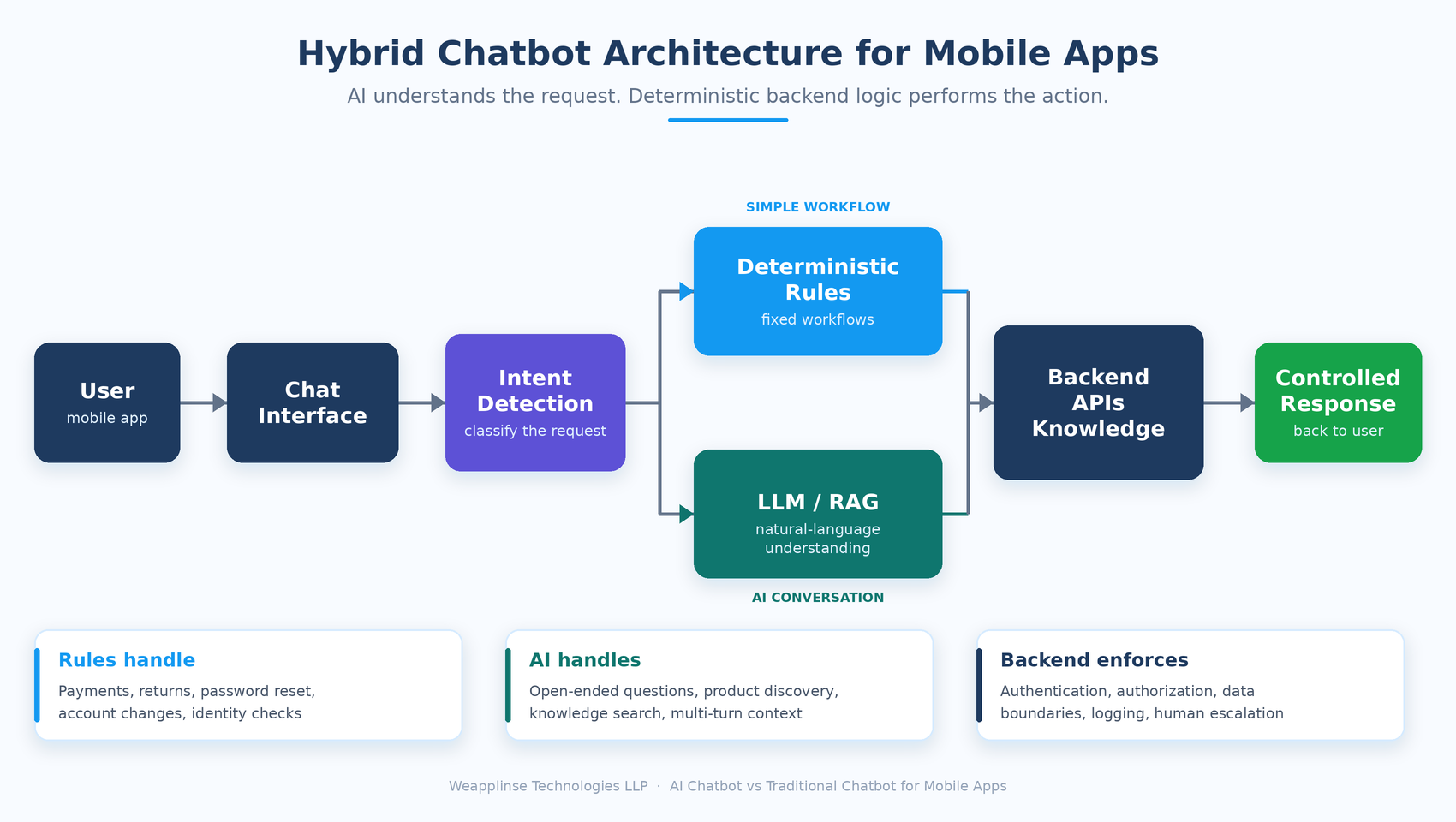
- For most production mobile apps, a hybrid chatbot is the safest choice: AI understands the request, deterministic backend logic performs sensitive actions.
- An AI model should never be the source of transactional data. Use authenticated APIs and trusted data retrieval.
What Is a Traditional Chatbot?
A traditional chatbot, often called a rule-based chatbot, operates on predefined logic: rules, keywords, decision trees, and scripted conversation paths. It can also use keyword or intent matching to decide which predefined response or workflow to trigger. IBM describes rule-based chatbots as systems that rely on predefined rules, decision trees, and scripted responses, and notes they suit conversations that are predictable and repetitive.
- Track order
- Cancel order
- Change delivery address
- Contact support
Typical traditional chatbot architecture
For "Where is my order?", the bot detects "order", starts the order-tracking flow, asks for an order number, then retrieves the order status. The chatbot does not need to generate a new answer for every conversation. Developers define the possible paths in advance.
What Is an AI Chatbot?
An AI chatbot uses artificial intelligence to interpret user requests and produce or select responses dynamically. Depending on the architecture, it may combine:
Google's Dialogflow documentation similarly separates deterministic and generative approaches, so conversational systems can pair language-model capability with more controlled responses. For background on the techniques involved, see this overview of retrieval-augmented generation.
AI Chatbot vs Traditional Chatbot: Key Differences
The biggest differences are conversation flexibility, predictability, development complexity, data requirements, cost, and control.
| Factor | Traditional Chatbot | AI Chatbot |
|---|---|---|
| Conversation style | Predefined | More flexible |
| User input | Usually constrained | Natural language |
| Responses | Prewritten or rule-driven | Dynamically generated or retrieved |
| Context handling | Limited unless specifically programmed | Can handle broader conversational context |
| Predictability | High | Depends on implementation |
| Complex questions | Limited | Better suited |
| Development complexity | Usually lower | Usually higher |
| AI infrastructure | Not necessarily required | Usually required |
| Maintenance | Update rules and flows | Monitor AI, prompts, knowledge and integrations |
| Hallucination risk | Very low if responses are fixed | Must be actively controlled |
| Best use | Structured workflows | Open-ended assistance |
| Hybrid support | Possible | Possible |
This table should not be read as "traditional = outdated" or "AI = automatically better." The right architecture depends on your app's actual requirements.
10 Differences Between AI and Traditional Chatbots, Explained
Conversation Flexibility
A traditional chatbot may expect an exact phrase such as "Cancel order". An AI chatbot can understand "I changed my mind. Can you cancel the order I placed this morning?" without requiring the predefined phrase. That flexibility needs testing, fallback behavior, monitoring, and controls.
- Traditional: fixed menus, FAQs, simple support flows, appointment selection, order status, basic account actions
- AI: open-ended questions, complex support, product recommendations, knowledge search, context-aware help
Context and Multi-Turn Conversations
In a hotel-booking conversation ("Next Friday for three nights", then "Two adults"), the bot must know that "two adults" belongs to the booking. A traditional chatbot can handle this, but developers must explicitly design and maintain the conversation state. AI offers more flexible language understanding, though context management still has to be designed on purpose.
A common mistake is assuming an LLM gives an app reliable long-term memory. It does not. If the chatbot needs earlier interactions, the application needs a mechanism to store, retrieve, and control that information.
Accuracy and Predictability
This is where traditional chatbots hold an advantage. A finance app answering "What is my current account balance?" must pull the number from an authorized account system, not from an AI model guessing. For sensitive workflows, use this pattern: User → AI understands request → application verifies permissions → backend/API retrieves data → controlled response.
- Payments
- Account changes
- Order cancellation
- Password reset
- Identity verification
- Financial transactions
AI can help interpret the request, but the operation itself should run through controlled application logic and authorized APIs.
Personalization
A traditional chatbot personalizes through explicit rules (for example, IF user_type = premium THEN show premium support options). An AI chatbot can combine several pieces of authorized information into a natural reply, such as "You are on the Premium plan, which includes priority support. Would you like me to connect you with a specialist?" Personalization must only use information the app is authorized to access.
- What user information can be accessed
- Which systems can be queried
- What information can be returned
- What data must never be exposed
- How user permissions are enforced
Integration With Mobile App Features
A chatbot becomes far more useful when connected to the app backend. The real value comes from linking it to APIs, databases, authentication, and business workflows.
- E-commerce: search products, check inventory, track orders, recommend products, start a return
- Banking: explain transactions, answer product questions, guide users to features; sensitive actions stay in authenticated workflows
- Healthcare: navigate the app, explain services, schedule appointments, retrieve permitted information, with careful privacy and safety handling
- Travel: search trips, answer destination questions, explain booking policies, modify eligible bookings, show itineraries
Development Complexity
Traditional chatbots are generally easier to control when the number of workflows is small. An AI chatbot may also need authentication, authorization, prompt management, retrieval systems, vector search, guardrails, logging, evaluation, cost monitoring, human escalation, abuse protection, and rate limiting.
Treat an AI chatbot as a product feature and software architecture decision, not as an AI API added to a chat screen.
Cost: AI vs Traditional
Total cost is more than development cost. For AI systems, usage volume also drives ongoing cost: thousands or millions of chatbot interactions must be included in the product's financial model. This matters when you calculate the break-even point for a mobile app.
- Traditional: initial development, conversation design, backend integration, maintenance, hosting, support
- AI: initial development, model/API usage, backend infrastructure, knowledge retrieval, storage, monitoring, testing and evaluation, security controls, maintenance, human escalation
Performance and User Experience
Mobile users expect quick replies. A traditional chatbot can often return a predefined response almost instantly. An AI chatbot may add steps: user message → AI processing → retrieval → API calls → response generation. Actual latency depends on the architecture, model, network, backend, and integrations.
- Loading states
- Streaming where appropriate
- Timeout handling
- Retry mechanisms
- Fallback responses
- Error handling
- Human support escalation
The goal is not to make the chatbot intelligent. It is to make it useful and reliable inside a mobile experience.
Security and Privacy
A chatbot may touch user profiles, orders, messages, documents, account data, business databases, internal knowledge, and payment-related workflows. An AI chatbot adds risk if sensitive data is sent to an external model, or if the model can reach systems without proper authorization. Build security in from the start. The OWASP Top 10 for LLM Applications is a useful checklist.
- Authentication: who is the user?
- Authorization: what may that user access?
- Data boundaries: what can the chatbot retrieve?
- Tool permissions: which APIs can the AI invoke?
- Logging: which conversations and actions are logged?
- Data retention: how long is conversation data stored?
- Human escalation: when does the bot hand over to a person?
AI Hallucinations vs Traditional Limitations
Both types have weaknesses. A traditional bot fails when a scenario is missing from its rules (for example, "Can I change my delivery address after the package has shipped?" may only return "Please select one of the following options"). An AI bot may give a confident answer that does not match the company's real policy, so its output should not be treated as authoritative for business-critical information.
Use AI understanding → trusted data retrieval → grounded response rather than AI model → guess the answer.
Architecture Comparison: Rules vs AI
The chatbot itself is only one part of the system. Compare the layers each approach typically needs.
Traditional chatbot
AI chatbot
Both flows can be built on cross-platform apps. Our teams work in Flutter and React Native, with the chatbot logic living behind a secure backend API.
When Should You Choose a Traditional Chatbot?
A traditional chatbot can be the better option if your mobile app has:
A food delivery app, for example, might use a simple chatbot for "Where is my order?", "How do I cancel?", and "How do I update my address?". If the workflows are predictable, adding an LLM may not add enough value to justify the extra complexity. This is especially true for an early release: see when a startup should move from MVP to full product before adding AI scope.
When Should You Choose an AI Chatbot?
AI becomes more attractive when users need to communicate naturally. In a travel app, a traditional flow might force Destination → Dates → Guests → Budget → Search. An AI chatbot could accept:
That request carries several pieces of information in a less predictable structure. AI can be useful for:
If AI fits, treat it as a core product investment. Our AI app development services cover model integration, retrieval, and guardrails.
When Is a Hybrid Chatbot Better?
For many mobile apps, the best architecture is neither purely AI nor purely rule-based. A hybrid design lets AI handle natural-language understanding while deterministic application logic controls sensitive actions.
Example: "I want to return my shoes."
The AI identifies the intent. The return process itself stays deterministic:
This approach gives you conversational flexibility without letting an AI model independently control critical business operations.
Which Is Better for Your Mobile App? A Decision Framework
There is no universal winner. Follow this path:
7 Questions to Ask Before Development
What are users actually asking?
Review real support conversations instead of guessing.
How many different conversation paths exist?
A small number of predictable paths may favor traditional automation.
Do users need natural-language input?
If users must ask complex questions in their own words, AI may provide more value.
Does the chatbot need business data?
If yes, identify the APIs and permissions required.
Does the chatbot perform sensitive actions?
If yes, use controlled backend workflows rather than unrestricted AI actions.
What happens when the chatbot does not know the answer?
Define a fallback before launch.
How will success be measured?
Track actual chatbot outcomes rather than simply counting conversations.
Weighing a custom chatbot against an off-the-shelf tool? Read our build vs buy framework first.
What Metrics Should You Track for a Chatbot?
A chatbot needs measurable business and product goals.
| Metric group | What to track |
|---|---|
| Usage | Conversations started, repeat questions, retention of chatbot users |
| Quality | Successful conversations, resolution rate, fallback rate, user satisfaction |
| Efficiency | Average response time, task completion rate, support tickets avoided, escalation rate |
| Business | Conversion rate, cost per conversation, AI API usage |
For mobile apps, Firebase Analytics supports custom events and reporting on engagement and conversions. Example events you could track (match the structure to your business goals):
chat_openedchat_message_sentchat_response_receivedchat_task_completedchat_fallbackchat_human_escalationchat_conversion After launch, our post-launch roadmap shows how to read these numbers, and AI usage cost belongs in your break-even calculation.
How to Build a Better Mobile AI Chatbot
If AI is appropriate, don't start by selecting an LLM. Start with the user problem.
Identify the highest-value use cases
Start with the user problem, not the LLM. Choose a small number of problems first: product discovery, order support, appointment booking, or FAQ assistance.
Define what the AI can and cannot do
AI can explain products, search approved knowledge, answer FAQs, and guide users. AI cannot change account ownership, approve refunds independently, access unauthorized customer data, or invent product policies.
Connect trusted data sources
Depending on the use case: product database, CMS, knowledge base, CRM, order API, or booking system.
Add authentication and authorization
A logged-in user does not mean the AI should have unrestricted access to backend data.
Add fallback handling
The chatbot should be able to say it cannot answer reliably and send the user to the right next step.
Test real conversations
Short and long questions, misspellings, ambiguous requests, multiple languages, follow-ups, unexpected questions, adversarial inputs, and sensitive information requests.
Measure after launch
Use real conversation and product analytics to confirm the chatbot is solving the intended problem.
Short, iterative releases suit chatbot work well; see our overview of agile mobile development.
How Weapplinse Can Help With Chatbot Development
Weapplinse designs and builds chatbots as part of a complete product: use-case definition, conversation design, rule-based and hybrid flows, AI integration, secure backend APIs, authentication and authorization, analytics, QA, and post-launch improvement, delivered through mobile app development and web application development. Need extra capacity? You can hire dedicated developers. Comparing vendors? Read how to choose the right mobile app development company in the USA, or start from our mobile app development services in the USA. Verified client reviews are on Clutch.
Final Takeaway: Solve a Real User Problem
The choice between an AI chatbot and a traditional chatbot should rest on conversation complexity, user expectations, business workflows, security requirements, integration needs, and operating cost. A traditional chatbot stays useful when conversations are predictable and responses must be tightly controlled. An AI chatbot becomes more valuable when users need to communicate naturally, ask complex questions, search knowledge, or receive contextual help.
For many production mobile apps, a hybrid architecture offers the most practical balance: AI handles flexible conversation while deterministic application logic controls important business operations. The goal is not to add AI because it is available. The goal is to build a chatbot that solves a real user problem reliably, securely, and measurably.
Planning a mobile app with conversational features? Define the use cases, data requirements, integrations, security boundaries, and success metrics first. Contact the Weapplinse team and we will help you choose the right approach.
Related Guides & Resources
Weapplinse guides
Frequently Asked Questions
A traditional chatbot generally follows predefined rules, conversation paths, or scripted responses. An AI chatbot can use NLP, machine learning, or language models to interpret more flexible user input and generate or retrieve responses dynamically.
Not necessarily. A rule-based chatbot can be better for predictable workflows where responses need to be tightly controlled. AI is more useful when users need flexible, natural-language conversations.
A simple traditional chatbot will often have lower implementation and ongoing infrastructure complexity. An AI chatbot can introduce additional model, infrastructure, monitoring, and integration costs. The actual cost depends on the required functionality and usage volume.
Yes. A hybrid architecture can use AI for natural-language understanding while using deterministic workflows for transactions and other controlled operations.
They can be connected to application data through appropriate backend APIs and permissions. The AI should not automatically receive unrestricted database access.
Security depends on the architecture and implementation. Authentication, authorization, data protection, API security, logging, access controls, and appropriate handling of sensitive information should be considered before deployment.
Some AI capabilities can be implemented on-device, but the available approach depends on the model, device capabilities, application requirements, and desired functionality. Cloud-based AI is commonly used when the app needs larger models or access to centralized business data.
Not always. If the MVP only needs a few predictable support workflows, a traditional chatbot may be sufficient. Startups should validate the actual user need before adding unnecessary AI complexity.
Review real user questions and support requests. If users frequently ask open-ended or differently worded questions that are difficult to cover with fixed workflows, AI may be appropriate. If most interactions follow predictable paths, a traditional or hybrid chatbot may be enough.


