


How Can You Reduce Mobile App Development Costs Without Compromising Quality?
Businesses can reduce mobile app development costs by defining clear requirements, prioritizing essential features, starting with an MVP, selecting suitable technologies, reusing reliable components, planning integrations, and testing throughout development. These methods reduce unnecessary work while preserving essential functionality, security, and user experience.
Key takeaways:
This guide explains practical ways to reduce mobile app development costs while maintaining functionality, scalability, security, and user experience.
1. Start With Clear Project Requirements
Unclear requirements are one of the most common reasons mobile app projects exceed their initial budgets.
When development begins without a defined scope, new features and changes keep entering the project. Developers may need to revise existing functionality, update database structures, modify interfaces, or rebuild completed components. These changes increase development time and cost.
Before starting development, document:
For example, a business planning a fitness application should first decide whether its initial release needs workout planning, user registration, progress tracking, subscriptions, and trainer communication. It may not need every possible feature at launch.
A clear project scope helps development teams estimate work more accurately and avoid unnecessary changes. Our guide on how to estimate your app development scope walks through the process step by step.
2. Prioritize Features Instead of Building Everything at Once
One of the most practical ways to control mobile app development costs is to prioritize features by business value. Many businesses begin with a long feature list because they want to match everything competitors offer. Implementing every feature in the first release increases development time, testing requirements, and project complexity.
A better approach is to divide features into three categories:
| Priority | Feature category | Development approach |
|---|---|---|
| High | Essential functionality | Include in the first release |
| Medium | Useful improvements | Consider for the next development phase |
| Low | Optional enhancements | Evaluate after collecting user feedback |
An eCommerce application may initially require:
Advanced recommendations, loyalty programs, complex personalization, and additional automation can be considered later if they support actual business requirements. This reduces the initial scope without removing the functionality needed to serve customers.
3. Build an MVP Before Investing in a Full Product
A Minimum Viable Product (MVP) is an early version of an application containing the essential functionality required to solve a specific user problem. Instead of developing a complete product immediately, businesses can launch a focused version, collect feedback, and use real user behavior to guide future improvements.
A startup planning a food delivery application might initially develop:
Advanced recommendations, loyalty systems, and complex analytics can be introduced once the core product is validated.
An MVP does not mean releasing an unfinished or unreliable application. It should still provide a usable interface, reliable core functionality, appropriate security, and sufficient testing. The objective is to reduce unnecessary initial scope, not to reduce quality.
Related reading: When Should a Startup Move From MVP to Full Product? and our MVP software development guide.
4. Choose the Right Technology Stack
Technology decisions influence development time, maintenance requirements, integration possibilities, and long-term costs. The most expensive technology is not necessarily the best choice, and the cheapest option is not always suitable. Select technologies according to application requirements.
Native development
Swift for iOS, Kotlin for Android- Uses platform-specific technologies
- Appropriate for platform-specific capabilities
- Suits specialized performance optimization
- Best for deep operating-system integration
Cross-platform development
Flutter, React Native- Shares a substantial portion of code across platforms
- Can reduce duplicated effort when iOS and Android features are similar
- Not automatically cheaper for every project
- Platform-specific features and complex integrations may still need extra work
Before selecting a technology, evaluate:
The objective is to choose a technology that supports the required functionality without introducing unnecessary complexity. If you are comparing frameworks, see our Flutter and React Native services, the official Flutter documentation, the React Native documentation, and platform resources from Android Developers and Apple Developer. For a wider planning view, read our complete mobile app development guide.
5. Reuse Existing Components and Libraries
Developing every application component from scratch increases project cost and development time. Many common functionalities can be implemented using established libraries, SDKs, and reusable components.
Common examples include:
Before integrating an external library or SDK, evaluate:
A business needing payment functionality can integrate a suitable payment provider instead of building payment-processing infrastructure independently. Managed platforms such as Google Firebase show how backend services can be reused. Reuse should always be based on technical suitability, not convenience alone.
6. Design the User Interface Before Development
Frequent design changes during development increase costs. If developers implement screens before the app structure and user flows are understood, changes to navigation, layouts, and interactions may require modifications across several components. Wireframes and prototypes help identify these issues earlier.
A practical design process:
Identify the main user journeys
Create basic wireframes
Define navigation and screen relationships
Prepare interactive prototypes
Review the design with stakeholders
Finalize important interface decisions before implementation
An application may have separate customer, administrator, and service-provider experiences. Mapping these workflows first reveals the required screens, permissions, and interactions, which reduces avoidable rework and creates a more consistent user experience.
7. Use a Modular Architecture
A well-structured application separates functionality into manageable components. Instead of building one tightly connected system, developers can organize the app into modules:
Typical modules:
This makes individual features easier to develop, test, maintain, and improve. If a business later changes its payment provider, a modular architecture makes it easier to update that integration without rewriting unrelated functionality. Modular development requires thoughtful initial architecture, but it can reduce maintenance effort and make future enhancements more manageable.
8. Plan Backend and API Requirements Carefully
Backend development is an important part of mobile app cost. The backend may manage authentication, business logic, databases, file storage, notifications, integrations, and administrative operations. Poor backend planning creates unnecessary development work and performance problems.
Before development, identify:
An application with customer registration, order management, and payment processing should define how these operations interact before implementation. A well-planned API structure reduces duplicated logic and simplifies communication between the mobile app and backend. Also avoid building backend services for features that are not part of the approved scope.
9. Identify and Fix Problems Early Through Testing
Testing should not be postponed until the application is almost complete. Defects found late are more expensive to resolve, especially when they affect multiple screens, APIs, or business workflows. A practical testing strategy includes:
Automated tests are also useful for functionality that needs repeated verification. The goal is to identify defects while they are still relatively easy to isolate and fix. Reducing testing to save money is usually a poor long-term strategy, because defects found after release lead to additional development work, customer complaints, and emergency fixes. For security baselines, see OWASP Mobile Application Security.
10. Select Third-Party Integrations Based on Actual Requirements
Third-party integrations can reduce development effort, but unnecessary integrations increase costs. Every additional service may introduce:
Hidden costs of each integration:
Prepare an integration list. For each one, identify:
A business may need payment processing, email notifications, analytics, and maps. It should not integrate several overlapping analytics platforms or unnecessary services without a clear business reason. This helps control both initial implementation costs and recurring operational expenses.
11. Avoid Unnecessary Custom Development
Custom development is valuable when a business needs functionality that existing tools cannot provide adequately. However, building standard functionality from scratch increases cost without creating meaningful business value.
Consider whether existing services can support:
Building a custom email-delivery infrastructure may be unnecessary when a suitable email service meets the requirements. Prioritize custom development for the features that differentiate the product or support essential business processes. Our build vs buy framework helps with this decision.
12. Plan for Scalability Without Overengineering
Businesses should consider future growth, but building infrastructure for an unrealistic future workload increases initial costs. A startup launching its first application may not need a highly distributed microservices architecture from day one. A simpler architecture is often enough if it supports the expected workload and allows future expansion.
A sensible approach:
Estimate realistic initial usage
Select infrastructure appropriate for current requirements
Monitor actual application performance
Identify bottlenecks as usage grows
Expand infrastructure when measurable requirements justify it
Scalability should be part of the architecture, but it should not become an excuse for unnecessary complexity.
13. Manage Scope Changes During Development
Even well-planned projects can require changes, but uncontrolled scope changes are a common source of budget increases. A new feature may affect:
A single change can touch:
Document the requested change
Identify the business reason
Estimate development effort
Check dependencies
Review its impact on the release timeline
Approve or postpone the change
Evaluate impact on cost, timeline, and existing functionality before approving a change. This lets stakeholders make informed decisions instead of continuously expanding the project. Short delivery cycles help here; see our overview of agile mobile development.
14. Choose the Right Development Partner
The development team's experience influences project cost, code quality, communication, and delivery efficiency. Choosing a partner only because of a low quotation can create problems if the team lacks the expertise the project needs.
When evaluating a development company, review:
Ask how the team handles changing requirements, testing, deployment, and maintenance. A suitable partner explains the technical decisions behind its estimate instead of simply giving a low overall price. The goal is to control the total cost of building and maintaining the application, not just the initial quotation. See our mobile app development services for how we work.
15. Consider Long-Term Maintenance Costs
Mobile app development costs do not end when the application is published. After launch, businesses may need to invest in:
Post-launch cost areas:
Ignoring these requirements results in higher costs later. Plan for maintenance during the initial project instead of treating it as an unexpected expense. A well-documented, maintainable application makes future changes easier. Track success with mobile app performance metrics and follow our post-launch roadmap.
Practical Example: Reducing Costs for an eCommerce App
Consider a business planning an eCommerce mobile app. Its initial feature list includes customer registration, product catalogue, product search, shopping cart, payment gateway, order tracking, loyalty program, AI recommendations, advanced analytics, multiple promotional campaigns, and personalized notifications. Building everything in the first release increases development scope considerably.
A more focused implementation could look like this:
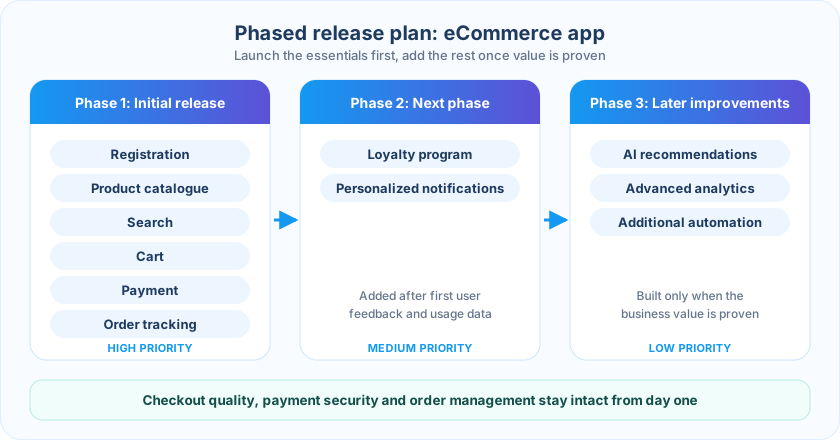
| Development phase | Features |
|---|---|
| Initial release | Registration, catalogue, search, cart, payment, order tracking |
| Next phase | Loyalty program, personalized notifications |
| Later improvements | AI recommendations, advanced analytics, additional automation |
The business launches with essential shopping functionality and a clear plan for future improvements. It does not compromise checkout quality, payment security, product browsing, or order management. It simply avoids investing in features before their value has been established.
Common Mistakes That Increase App Development Costs
Some cost-saving decisions actually make projects more expensive. Avoid these mistakes:
Choosing a developer based only on price
Low initial quotations do not guarantee lower total project costs.
Skipping project planning
Unclear requirements often lead to rework and changing estimates.
Adding too many features before launch
Features without validated business value increase development effort unnecessarily.
Ignoring testing
Insufficient testing leads to expensive post-launch fixes.
Selecting technology without evaluating requirements
An unsuitable framework or architecture creates performance and maintenance problems.
Ignoring security
Security belongs in development and testing, not in an optional enhancement list.
Overengineering the backend
Infrastructure beyond actual project requirements adds complexity and cost.
Ignoring maintenance
An application needs ongoing technical attention after release.
How Much Can Businesses Save on Mobile App Development?
There is no reliable percentage that applies to every mobile application. Potential savings depend on the original project scope, technical architecture, feature requirements, existing infrastructure, integration needs, and development process.
Reducing unnecessary features may significantly cut effort in a feature-heavy application, while a suitable cross-platform approach may reduce duplicated implementation work for an app targeting both iOS and Android. Savings should always be evaluated against the quality and business requirements that must remain intact.
Ask these questions about any proposed cost reduction:
A decision that lowers the initial quotation but creates substantial future rework is not a cost-saving decision.
Mobile App Development Cost Optimization Checklist
Before starting development, review these points. Using this checklist helps identify unnecessary work and supports better budget decisions.
How Weapplinse Can Help You Plan an Efficient Budget
Controlling cost starts with a well-defined scope and sound technical decisions. Our team helps you evaluate requirements, define the development scope, and plan an appropriate technical approach through our mobile app development services, with supporting web application development and backend API work.
Need extra engineering capacity? You can hire dedicated developers. US-based teams can start from our mobile app development services in the USA page, or review our mobile app development cost guide for the USA.
Final Thoughts: Spend Less Without Building Less Value
Reducing mobile app development costs is not about removing important features, hiring the cheapest team, or skipping essential testing. It is about making better technical and business decisions throughout the development lifecycle.
Evaluate every cost-saving decision by its long-term impact. A well-planned application can control the initial investment while maintaining the security, performance, usability, and maintainability required for business growth.
Planning a mobile application? Weapplinse's mobile app development services can help you evaluate your requirements and define the scope. Contact our team to get started.
Related Guides & Resources
Weapplinse guides
- Mobile App Development Cost in 2026
- How to Estimate Mobile App Development Scope Before Getting a Quote
- When Should a Startup Move From MVP to Full Product?
- MVP Software Development Guide
- Mobile App Development Ultimate Guide 2026
- Mobile App KPIs to Measure App Success
- Build vs Buy: Custom Mobile App
Frequently Asked Questions
You can reduce development costs by defining clear requirements, prioritizing essential features, starting with an MVP, selecting an appropriate technology stack, reusing reliable components, planning integrations, and identifying defects early through testing.
It can reduce duplicated development effort when an application targets both iOS and Android. However, the actual savings depend on application complexity, platform-specific requirements, integrations, and the capabilities of the selected framework.
An MVP can reduce initial development costs because it focuses on essential functionality rather than every planned feature. It should still include appropriate security, testing, and a usable user experience.
Yes. Focus on removing unnecessary work rather than reducing essential engineering activities. Better planning, suitable architecture, reusable components, and controlled scope changes can reduce costs while preserving quality.
Cross-platform development can be more cost-efficient for applications that share substantial functionality across iOS and Android. Native development may be more suitable when platform-specific features or specialized performance requirements justify separate implementations.
Integrations can reduce the need to build standard functionality from scratch, but each one introduces implementation, authentication, testing, maintenance, and potentially recurring service costs. Choose integrations based on actual requirements.
Common reasons include unclear requirements, changing project scope, underestimated integrations, technical complexity, insufficient testing, delayed decisions, and unexpected maintenance requirements.
No. Testing helps identify functional, performance, compatibility, and security problems before release. Reducing essential testing creates additional costs through production defects and emergency fixes.
Prepare your objectives, target users, feature list, platform requirements, design expectations, integration needs, security requirements, and expected timeline. A clearly defined scope makes estimates more useful and comparable.
No. Evaluate technical expertise, project experience, development practices, communication, testing, security, code ownership, and maintenance support alongside the quotation.


