


What Is Voice AI in a Mobile App?
Voice AI in a mobile app is the use of speech recognition, AI language understanding, app APIs, and text-to-speech so users can talk to the app and hear or see a response. It ranges from simple voice search and commands to full conversational assistants. Cost depends on feature complexity, speech and AI usage, integrations, security, languages, real-time needs, and testing, so there is no single fixed price.
Key takeaways:
What Is Voice AI?
Voice AI is the use of artificial intelligence and speech technologies that lets users communicate with a mobile application in spoken language. A basic feature converts "Search for running shoes" into text and runs it as a normal search. A more advanced assistant understands "Find lightweight running shoes under $100 and show me the ones available in my size," then interprets the request, retrieves information, and may perform several actions before it answers.
Voice AI vs speech recognition
| Term | Speech recognition | Voice AI |
|---|---|---|
| What it does | Converts spoken audio into text | Combines speech recognition, language understanding, AI models, app logic, and speech generation |
| Result | A transcript | An interactive experience that can take action |
For background on the underlying technology, see this overview of speech recognition.
How Does Voice AI Work in a Mobile App?
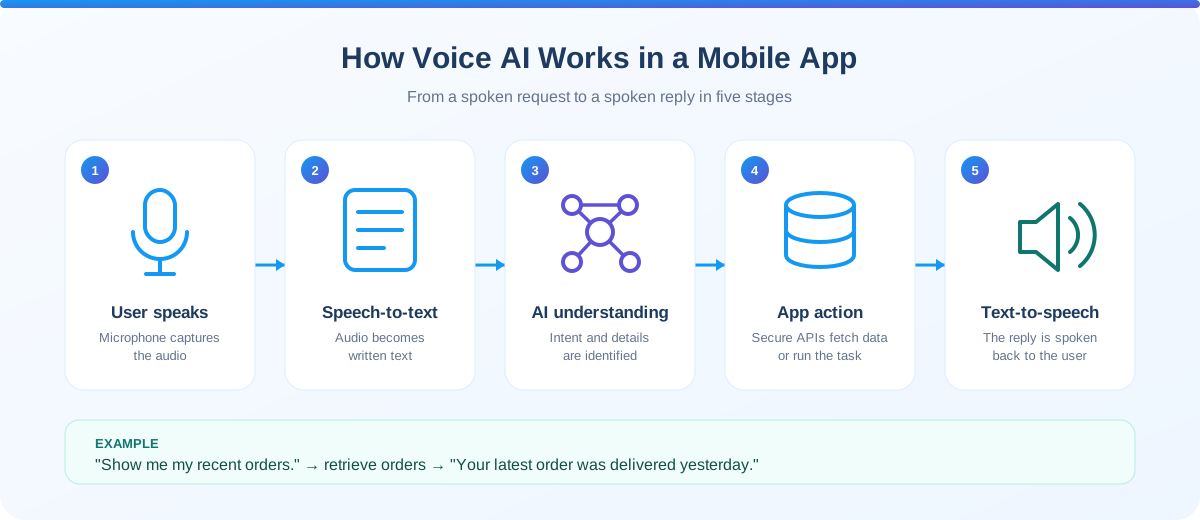
The user speaks, the microphone captures audio, and the system moves through five stages. Depending on the app, some processing happens on the device and some in cloud services or a backend.
Speech-to-text
Speech-to-text converts the user's spoken audio into text, for example "Show me my recent orders." The text is then passed to application logic or an AI model.
Language understanding
The system works out what the user wants. "Book me a table tomorrow evening" becomes a restaurant_booking intent with parameters such as date, time, and party size.
AI reasoning or application logic
The system decides which information or action is needed: search products, retrieve an order, create a task, query an account, search a knowledge base, or call a business API.
Response generation
The system creates the reply, for example "Your latest order was delivered yesterday."
Text-to-speech
The reply is converted back into spoken audio, so the user hears the answer instead of reading it.
The result is a conversational experience rather than one that forces users to read every response.
10 Voice AI Use Cases in Mobile Apps
Voice AI is useful across many industries, but the right implementation depends on the user's actual task. Complexity labels are planning guides, not prices.
Voice Search
Low to mediumThe spoken query is converted into text and processed by your existing search system. Users can search without typing, which helps when typing is inconvenient.
Voice Commands
Low to mediumSpecific spoken commands map directly to app actions such as creating a reminder, starting a workout, adding a list item, or marking a task complete. Command systems are more predictable than open-ended assistants.
AI Voice Assistants
Medium to highA conversational assistant keeps a multi-turn dialogue going while it collects what the user needs. It can support questions, recommendations, navigation, search, account help, and content or product discovery, but it should never have unrestricted access to sensitive operations.
Voice Customer Support
HighThe assistant answers common questions from an approved knowledge base and transfers complex issues to a human agent. Account-specific actions need identity verification and authorization first.
Voice Shopping
Medium to highThe system extracts category, color, use case, and price limit from the request and sends them to product search. The AI helps users find products; they still review details before they buy.
Voice Banking and Finance
HighVoice suits low-risk information requests such as balances, recent transactions, and spending summaries. Strong authentication, authorization, logging, and privacy controls are essential, and high-impact actions need confirmation and security checks.
Fitness Apps
Low to mediumVoice works while hands are busy. The app combines voice with existing workout data and logic so users can navigate a session without touching the screen.
Voice Learning Assistants
Medium to highEducational apps can offer language practice, pronunciation exercises, spoken quizzes, and lesson navigation. Provide feedback and do not present generated information as authoritative without checks.
Voice Accessibility
MediumVoice navigation, dictation, spoken instructions, and read-aloud responses help people who find typing or small controls difficult. Voice should complement accessible visual controls, not replace them.
Voice-Powered Productivity
Low to mediumThe system extracts the action, title, date, and time, then shows the interpreted task and asks for confirmation before creating it. This is a good example of why confirmation UX matters.
If your goal is text-based assistance instead, compare options in our guide to AI chatbot vs traditional chatbot for mobile apps.
Voice AI Technology Stack
A typical voice AI mobile app has five technology layers.
Platform tooling is a good starting point for evaluation: see Apple's Speech framework, Android's SpeechRecognizer, and cloud services such as Google Cloud Speech-to-Text and Text-to-Speech. Cross-platform teams can build the voice UI in Flutter or React Native.
Voice AI Architecture for Mobile Apps
A practical architecture moves audio from the app through speech-to-text and an AI layer, which calls your APIs and knowledge sources, then returns a spoken response.
Design the architecture around your actual requirements rather than adding every possible AI component.
Standard Voice Commands vs Conversational Voice AI
One of the most important decisions is whether your app needs real-time conversation.
Standard voice command
Speech → Text → Intent → Action- Example: "Start my workout."
- Relatively simple to build
- Predictable and easy to test
- Usually lower cost
Conversational voice AI
Multi-turn dialogue- Example: "I want a workout for today."
- Needs conversation state and context management
- Needs AI processing and richer error handling
- Usually higher cost
A command-based feature can be relatively inexpensive compared with a continuously interactive voice assistant.
What Makes Voice AI Difficult?
Voice interfaces introduce challenges that ordinary text apps do not have.
How Much Does Voice AI Cost in a Mobile App?
There is no single price. A simple voice search feature and a real-time conversational assistant are very different projects. These are the main cost factors.
Voice AI cost levels by project type
| Voice AI type | Typical complexity | Main requirements |
|---|---|---|
| Voice search | Low | Speech-to-text + existing search |
| Voice commands | Low to medium | Speech recognition + intent handling |
| Voice navigation | Medium | Intent detection + app actions |
| AI voice assistant | Medium to high | AI + conversation state + APIs |
| Customer-support voice AI | High | AI + knowledge base + authentication + escalation |
| Real-time conversational assistant | High | Streaming audio + AI + low latency + conversation management |
These categories are planning guidelines, not fixed development prices. For wider budget benchmarks, see mobile app development cost in the USA for 2026 and the 2026 cost overview.
How to Estimate Voice AI Development Cost
Break the project into components instead of guessing one number.
Define the voice experience
For example: users can search products using natural speech.
Define supported platforms
iOS, Android, or both.
Define supported languages
One language is generally simpler than several with different speech characteristics.
Define the AI interaction
Speech-to-text only, commands, AI-generated responses, multi-turn conversation, or real-time interaction.
Identify integrations
List every API and system the assistant must access.
Estimate usage
Monthly active users, voice sessions per user, average session length, audio volume, and AI requests.
Include ongoing costs
Development + AI/API usage + infrastructure + monitoring + maintenance + testing.
Example: a voice shopping assistant
The project might need a mobile voice interface, speech-to-text, AI intent processing, a product-search API, recommendation logic, text-to-speech, authentication, analytics, and error handling.
If your app already has secure authentication, product APIs, search, analytics, and backend infrastructure, voice integration can take significantly less work than building the whole ecosystem from scratch. Estimate from scope and existing technology, not from the number of voice features.
How to Reduce Voice AI Development Costs
You can control cost without removing the core user value.
Start with one voice workflow
Validate voice product search before building a full conversational shopping assistant.
Reuse existing APIs
If search, orders, products, accounts, or bookings APIs exist, the voice layer can sit on top of them.
Use managed AI services where appropriate
Managed speech and AI services reduce infrastructure needs. The trade-off is ongoing service cost and provider dependency.
Use confirmation for important actions
Asking "You want to create a meeting tomorrow at 10 AM. Should I create it?" is simpler than building logic for every scenario and prevents accidental actions.
Measure before scaling
Monitor real usage before investing in a more complex architecture.
Treat the first release as a test. Our guide on when to move from MVP to full product explains how to decide when to scale it.
Voice AI Privacy and Security
Voice data can contain sensitive information. Consider these controls.
Privacy requirements vary by jurisdiction and application type, so review the final implementation against the rules that apply to your product. The OWASP MASVS is a widely used security baseline for mobile apps.
How to Improve Voice AI User Experience
A technically working assistant can still deliver a poor experience. Follow these principles.
Keep responses concise
Replace "Based on the information you provided, I have identified several products that could potentially meet your requirements..." with "I found three products that match your requirements."
Confirm important actions
For purchases, bookings, and account changes, confirmation prevents mistakes.
Allow users to interrupt
Conversational assistants should not make users wait through long replies before speaking again.
Provide visual feedback
Show listening, processing, response, and error states so users always know what the app is doing.
Provide a fallback
If recognition fails, let users type. If the AI cannot answer, offer another way to continue.
Handle ambiguity naturally
When the user says "Book it" and the referent is unclear, ask a clarifying question instead of guessing.
Pair voice with accessible visual controls and follow platform guidance such as Apple's Human Interface Guidelines and Material Design 3.
Voice AI vs Traditional Chatbot
| Feature | Traditional chatbot | Voice AI |
|---|---|---|
| Input | Text | Speech |
| Output | Text | Voice and/or text |
| Hands-free use | Limited | Strong |
| Speech recognition | Not required | Required |
| Audio processing | Not required | Required |
| Real-time interaction | Optional | Often important |
| Accessibility potential | High | High |
| Implementation complexity | Usually lower | Usually higher |
| Latency sensitivity | Moderate | High |
A voice AI assistant can also have a visual chat interface, creating a multimodal experience.
When Should a Mobile App Add Voice AI?
Voice AI is a strong candidate when
- Users frequently perform repetitive actions
- Typing is inconvenient
- The app is used hands-free
- Users ask questions in conversational language
- Voice can reduce navigation effort
- The app has a clear voice-first workflow
It may not be necessary when
- Users rarely need voice interaction
- Visual controls are faster for the task
- Recognition would add more errors than benefits
- Voice creates unnecessary privacy concerns for sensitive data
- Simple search or commands already solve the problem
Ask: "Which user problem becomes significantly easier through voice?" If you cannot name one, you probably do not need voice yet. See our build vs buy framework for the wider build decision.
A Practical Voice AI Implementation Roadmap
Phase 1: Identify the use case
Choose one high-value workflow.
Phase 2: Validate the interaction
Prototype it and test whether users actually prefer voice.
Phase 3: Select technology
Choose speech recognition, AI model, text-to-speech, and backend architecture based on real requirements.
Phase 4: Integrate APIs
Connect voice AI to your existing backend and approved data sources.
Phase 5: Build the mobile UI
Add microphone interaction, listening indicator, transcription, AI response, voice playback, and error handling.
Phase 6: Add security
Implement authentication, authorization, secure API communication, data controls, and appropriate logging.
Phase 7: Test
Cover devices, languages, accents, noise levels, network conditions, and different user intents.
Phase 8: Launch gradually
Start with a controlled release where practical.
Phase 9: Measure
Track voice usage, successful and failed requests, completion rate, latency, satisfaction, and task completion.
Phase 10: Expand
Add capabilities only after the first workflow is validated.
Short, iterative releases work best. See our overview of agile mobile development.
Key Metrics for a Voice AI Feature
Measure the feature against its purpose.
| Metric | What it measures |
|---|---|
| Voice adoption | How many users use voice |
| Successful request rate | How often requests are completed |
| Speech recognition error rate | Recognition quality |
| Task completion rate | Whether users achieve their goal |
| Average response latency | Speed of the experience |
| Conversation abandonment | Where users leave |
| Fallback-to-text rate | How often voice fails |
| User satisfaction | Perceived quality |
| Conversion rate | Business outcome |
| Repeat voice usage | Whether users find voice valuable |
For broader measurement, read our guide to mobile app KPIs. Tools such as Firebase Analytics cover event tracking, and our post-launch roadmap shows how to monitor a new release.
Common Voice AI Development Mistakes
Building without a clear use case
Adding voice because it is trendy does not guarantee adoption.
Ignoring latency
An accurate reply that arrives too slowly still creates a poor experience.
Giving AI unrestricted application access
Let the AI use controlled APIs and permissions, not raw access to app data.
Skipping confirmation
Important actions should not run because a model misread a sentence.
Storing unnecessary audio
If recordings are not needed, do not retain them.
Ignoring fallback interaction
Users need another way to finish the task when voice fails.
Overloading the assistant with long responses
Voice interfaces need concise answers.
Underestimating testing
Speech behavior varies across environments, devices, languages, and users.
How Weapplinse Can Help With Voice AI
Voice AI needs coordination across product strategy, UX, mobile engineering, backend, AI integration, security, and QA. Weapplinse helps businesses define the technical scope and build voice features through AI services and solutions and mobile app development services, with supporting web application development and backend API work.
Teams can start with a focused workflow such as voice search or commands, then expand. Need extra engineering capacity? You can hire dedicated developers. US-based teams can start from our mobile app development services in the USA page, or review custom mobile app development in the USA. You can also read verified client reviews on Clutch.
Final Thoughts: Building Voice AI That Users Actually Want
Voice AI can turn a screen-based app into a more natural conversational experience. Users can search, navigate, ask questions, create tasks, and discover products by speaking. A production-ready implementation needs more than speech recognition:
You do not need a complex assistant on day one. Start with voice search, voice commands, or voice-powered support to validate demand before investing in real-time voice AI. When you plan the budget, include the initial build and ongoing AI services, speech processing, infrastructure, monitoring, maintenance, and testing.
The best voice AI experience makes a specific mobile task faster, easier, and more natural. Contact the Weapplinse team to scope your voice feature.
Related Guides & Resources
Weapplinse guides
Frequently Asked Questions
Voice AI allows users to interact with a mobile application using spoken language. It can combine speech recognition, AI-based language understanding, application APIs, and text-to-speech to support voice commands and conversations.
A typical system captures the user's speech, converts it into text, interprets the request, interacts with application services or AI models, generates a response, and optionally converts that response back into speech.
Common use cases include voice search, voice commands, customer support, AI assistants, shopping, productivity, fitness, education, accessibility, and hands-free navigation.
There is no fixed cost. It depends on the voice feature, speech and AI services, number of users, languages, backend integration, real-time requirements, security, testing, and ongoing API usage.
Usually, a full voice AI system requires more technology and infrastructure because it may involve speech recognition, audio processing, text-to-speech, and stricter latency requirements. The cost still depends heavily on the specific implementation.
Some speech and AI capabilities can run on-device, but offline functionality depends on the technology, device capabilities, model size, language support, and app requirements.
Yes. Voice AI can trigger app actions through controlled backend APIs or application functions. Important actions should include authentication, authorization, validation, and confirmation.
Voice AI can be implemented securely, but it needs appropriate controls for microphone permissions, authentication, authorization, data transmission, storage, third-party services, logging, and privacy.
A typical system may require speech-to-text, an AI or language-understanding layer, backend APIs, application logic, text-to-speech, analytics, and security infrastructure.
No. Use voice AI when it makes a meaningful user task easier. For some apps, conventional search, navigation, or text interaction provides a better experience.


