


How Does AI Personalization Improve Mobile App User Experience?
AI personalization improves mobile app user experience by adapting recommendations, search results, onboarding, notifications, and in-app assistance to each user's preferences, behavior, and context. Done well, it helps users find relevant content faster and complete tasks with less effort, while respecting privacy and keeping users in control.
Key takeaways
- AI personalization adapts content, recommendations, search, and assistance to individual users or relevant user groups.
- It works best when it solves a real discovery, relevance, or assistance problem, not when it is added to every screen.
- Explicit preferences and simple rules are often enough for a first version; AI can be added when data and use case justify it.
- Keep user control: let people dismiss recommendations, change preferences, and use manual search and filters.
- Measure outcomes beyond clicks, including task completion, satisfaction, dismissals, and notification opt-outs.
What Is AI Personalization in Mobile Apps?
AI personalization is the use of artificial intelligence and machine learning to adapt an application's content, recommendations, interactions, or functionality to individual users or relevant user groups.
Traditional personalization might display content based on a user's manually selected interests. AI-powered personalization can go further by analyzing patterns in permitted behavioral data and estimating which content, product, feature, or action may be most relevant. A shopping app could use selected preferences, product views, searches, and purchases to recommend products, while a streaming app could use viewing history and content characteristics to suggest what to watch next.
AI personalization may include:
Recommendation systems commonly use stages such as candidate generation, scoring, and re-ranking to identify and order potentially relevant items. The exact architecture depends on the product, available data, and performance requirements; Google for Developers explains these recommendation-system approaches. For the build itself, see how to build an AI-powered recommendation system for a mobile app. The objective is not to make every user's app completely different. It is to remove unnecessary friction and make useful information easier to discover.
How Does AI Personalization Work in a Mobile App?
AI personalization typically combines user interactions, contextual information, recommendation logic, and application services. A simplified workflow:
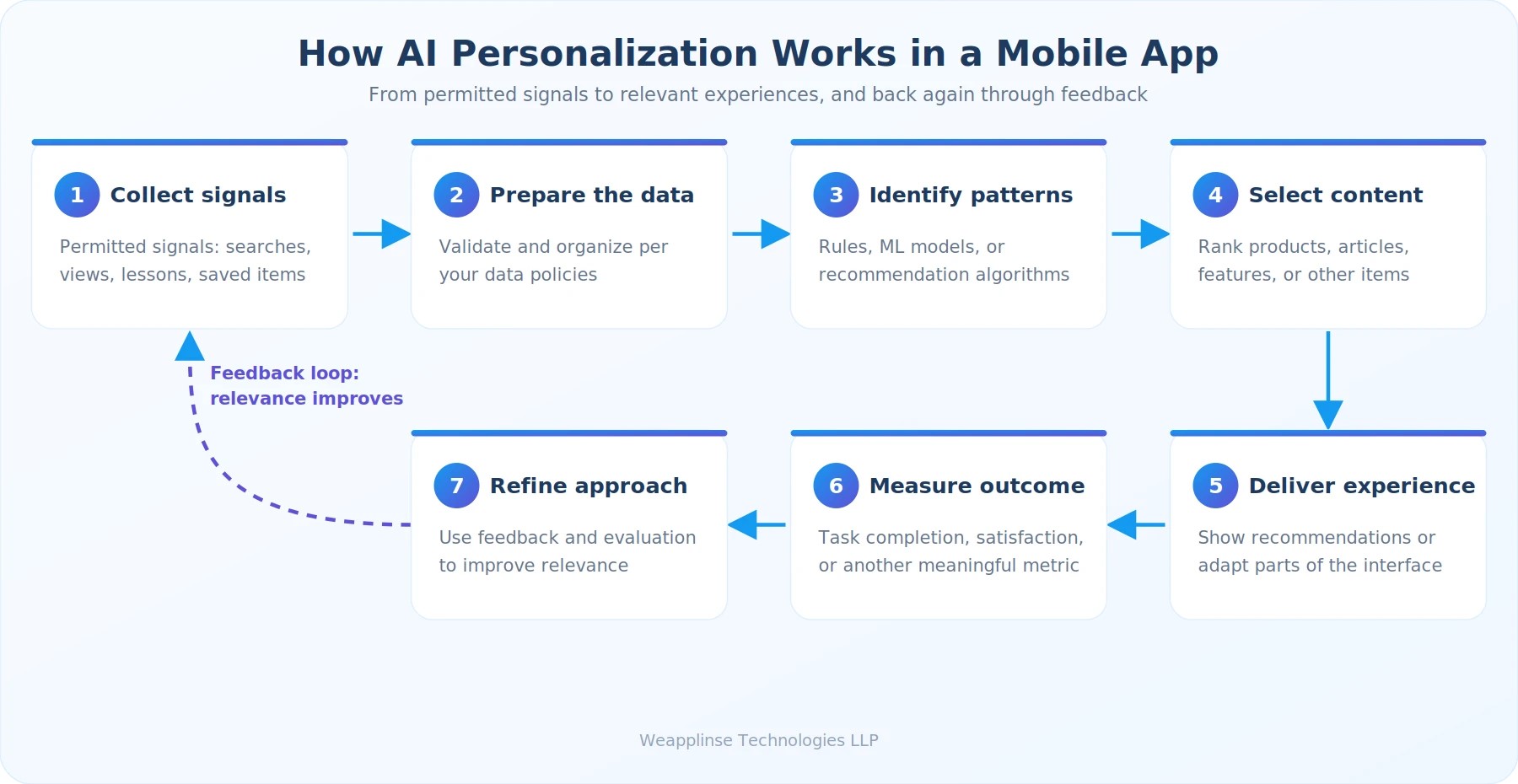
Collect permitted signals
Record relevant events such as searches, product views, completed lessons, or saved items.
Prepare the data
Validate, organize, and process the information according to the application's data policies.
Identify patterns
Use rules, machine learning models, or recommendation algorithms to estimate user interests.
Select relevant content
Rank suitable products, articles, features, or other items.
Deliver the experience
Display recommendations or adapt selected parts of the interface.
Measure the outcome
Evaluate whether the experience improves task completion, satisfaction, or another meaningful metric.
Refine the approach
Use appropriate feedback and evaluation to improve relevance over time.
Example: if a user repeatedly searches for beginner fitness routines and saves low-impact workouts, a fitness app might prioritize beginner-friendly, low-impact plans. The app should still let the user explore other options and change preferences. Past behavior is a useful signal, not a permanent definition of what someone wants.
8 Ways AI Personalization Can Improve Mobile App User Experience
More Relevant Recommendations
Finding the right product, video, article, or service can become difficult when an app contains a large catalog. AI-powered recommendation systems help users discover relevant items by considering several factors.
Recommendation systems may use content-based filtering, collaborative filtering, or a combination. Content-based methods compare item characteristics with a user's interests, while collaborative filtering uses patterns across user-item interactions. For example, an eCommerce app can recommend products related to a user's browsing interests, and a media app can suggest similar content while also introducing different categories to support discovery.
- Explicitly selected interests
- Previous interactions
- Item characteristics
- Search activity
- Saved or purchased items
- Context relevant to the current task
Personalized Onboarding
The first few interactions often decide whether a user understands an app's value. A generic onboarding flow asks everyone to complete the same steps, even when their needs differ. AI-assisted personalization can adapt the introduction to a user's selected goals or early interactions.
You do not necessarily need a complex AI model. Explicit preferences and straightforward rules may be enough for the first version, and AI can be introduced once the application has a clear use case and sufficient reliable data.
- Budgeting app: ask whether the user wants to track spending, set savings goals, or understand recurring expenses.
- Learning app: ask about current skill level and preferred topics.
- Project-management app: highlight features relevant to an individual contributor or a team manager.
Context-Aware Search and Discovery
Search is often one of the most important interactions in a mobile app, and users may not know the exact name of what they want. AI can improve discovery through semantic search, query understanding, personalized ranking, and recommendations related to the current search.
A travel app user might search for "a quiet weekend trip near the mountains," and the system could interpret destination type, distance, and travel dates to narrow results. In a shopping app, "comfortable shoes for walking all day" can return results that match the use case rather than only exact keywords.
More Relevant Notifications
Push notifications can help users remember tasks, discover updates, or return to unfinished activity, but generic or excessive messages interrupt people and reduce trust. AI-assisted systems can help decide which message is relevant, which channel fits, and when a notification may be useful.
Personalization is not an excuse to send more notifications. The goal is fewer, more useful messages.
- Reminding a user about a task they explicitly scheduled
- Notifying a shopper about a requested product availability update
- Sending a learning reminder based on a user-selected study schedule
- Informing a traveler about a change to an existing booking
Predictive Assistance
Predictive personalization uses available signals to estimate what a user may need next. A productivity app might highlight a recently used project, a navigation app might make a previously selected destination easier to reach, and a banking app could categorize recurring expenses to help users review spending.
Predictions should support the user's intention rather than assume it. "Continue your recent project" is helpful when it is easy to dismiss. Automatically making a consequential decision on the user's behalf is a different matter.
Adaptive Interfaces and User Preferences
AI can help determine which content or interface elements are most useful in a given context. A learning app could prioritize the current course, while a business app could surface projects most relevant to a user's role. Not every adaptation requires AI, though: many interface preferences are better handled through explicit settings and accessibility options.
- Preferred language
- Content categories
- Frequently used features
- Relevant dashboard widgets
- Preferred notification settings
- Display and accessibility preferences
More Helpful In-App Support
AI-powered assistants can personalize support using the user's current task and authorized application context. A shopping assistant could explain a return policy and guide an eligible user through the return. A learning assistant could explain a concept using examples from the learner's current lesson.
A well-designed assistant distinguishes general guidance from actions that need verified information. For account-specific requests, the app should authenticate the user, enforce permissions, retrieve information through approved backend services, and confirm the outcome.
Better Accessibility and Language Experiences
Personalization can make an app more comfortable and accessible for different users. AI can assist with some language and accessibility tasks, but automated output must be tested: translation errors, poor speech recognition, or inappropriate content adaptation can make an app less accessible rather than more.
- Remembering a preferred language
- Adjustable text and display settings
- Speech-to-text or text-to-speech
- Adapting instructional complexity
- Natural-language search
- Captions or alternative content formats
AI Personalization Examples Across Mobile App Industries
The best strategy depends on the user's goal and the type of application.
| Mobile app type | Personalization example | Potential UX benefit |
|---|---|---|
| eCommerce | Product recommendations based on relevant interests | Easier product discovery |
| Education | Lessons adapted to demonstrated progress | More relevant learning |
| Fitness | Workout suggestions based on goals and activity preferences | More suitable routines |
| Travel | Destination and itinerary suggestions based on stated requirements | Easier trip planning |
| Banking | Spending summaries and user-requested financial insights | Clearer financial information |
| Healthcare | Relevant appointment reminders and navigation assistance | Easier access to services |
| Entertainment | Personalized content discovery | Less time browsing |
| Productivity | Relevant projects, tasks, and shortcuts | Faster task completion |
These are implementation examples, not guaranteed outcomes. Results depend on recommendation quality, app design, and the needs of your users.
Example: AI Personalization in an eCommerce App
Consider a user who searches for running shoes, compares several products, and saves a particular pair. A personalized experience might:
The app should not infer sensitive personal characteristics or use hidden assumptions when simpler, user-provided preferences are sufficient.
Example: AI Personalization in a Learning App
A learner completes a beginner lesson but struggles with a particular topic. The app could recommend a practice exercise, provide an alternative explanation, or offer a review of the earlier lesson. The recommendation should rest on relevant learning signals, and the learner should remain free to choose another topic or path.
What Technologies Power AI Personalization?
The right technology depends on the experience you want to deliver. A simple preference-based feature may not need machine learning, while a large catalog or complex recommendation system may benefit from more advanced models.
For mobile measurement, Google Analytics for Firebase supports app usage analytics, custom events, and audience analysis. If you are considering a conversational layer, compare approaches in our guide to AI chatbots vs traditional chatbots for mobile apps.
How to Implement AI Personalization in a Mobile App
A successful implementation begins with a specific user problem, not with selecting an AI model.
Define the user experience problem
Identify the task users find difficult, such as finding relevant products, discovering suitable content, completing onboarding, returning to unfinished tasks, getting support, or navigating a large catalog. Define what a better experience looks like before choosing a solution.
Select a measurable use case
Start with one feature where personalization can make a meaningful difference. A product recommendation module is easier to evaluate than personalizing the entire app at once.
Identify the necessary data
Determine which information the feature actually needs: user-selected preferences, search queries, product or content interactions, completed tasks, saved items, feedback on recommendations, and relevant session context. Collect only what the defined purpose requires, and set retention limits, access controls, and consent requirements where applicable.
Choose the appropriate approach
Options include explicit user preferences, rule-based personalization, content-based recommendations, collaborative filtering, machine learning ranking, contextual recommendations, and generative AI assistance. A hybrid is often suitable: business rules enforce eligibility and safety while a model ranks eligible items.
Integrate with the app and backend
A typical flow is Mobile app, secure backend/API, personalization service, approved data sources, ranked result, mobile interface. The app should not contain private model credentials or unrestricted database access; the backend enforces authentication and authorization.
Design for errors and fallback
Plan for default recommendations, loading and error states, empty results, user corrections, manual filters, feedback controls, and graceful fallback when the AI service is unavailable.
Test with real users
Test across devices, network conditions, user types, and data availability levels. Check that recommendations are relevant, understandable, inclusive, and easy to dismiss, and that core navigation stays clear.
Measure and improve
Launch with a controlled rollout where practical, compare against a suitable baseline, investigate negative feedback, and improve based on evidence.
For businesses planning a broader rollout, Weapplinse AI services and solutions and mobile app development services are practical starting points for evaluating AI capabilities and app requirements. Short, iterative releases work best; see our overview of agile mobile development.
Privacy, Security, and Ethical Considerations
Personalization should make the experience more useful without making users feel monitored or manipulated.
Collect only necessary information
Avoid collecting data simply because it may be useful someday. Define the purpose of each data field and limit access to the teams and services that need it.
Explain how personalization works
Where appropriate, tell users why they see a recommendation and give them controls to update preferences.
Give users meaningful choices
Allow users to adjust personalization settings, dismiss recommendations, and use essential features without unnecessary profiling where feasible.
Protect sensitive information
Do not expose personal data in model prompts, analytics events, logs, or API responses unnecessarily. Apply appropriate authentication, authorization, encryption, retention, and access controls.
Monitor bias and relevance
A recommendation system can repeatedly favor popular items, overlook less-represented users, or narrow the range of content a user sees. Evaluate diversity, relevance, and fairness for your use case.
Avoid manipulative engagement tactics
More screen time is not automatically a better experience. Personalization should help users reach their goals rather than encourage unnecessary interactions or unwanted purchases.
Privacy and data-protection requirements vary by jurisdiction and use case. Review the laws and platform policies that apply to your app before collecting or processing personal data.
How to Measure the Impact of AI Personalization
Evaluate a personalized feature against a clear business and user-experience objective.
| Metric | What it helps you understand |
|---|---|
| Recommendation click-through rate | Whether users select recommended items |
| Conversion rate | Whether the experience supports the intended action |
| Task completion rate | Whether users complete important workflows |
| Search success rate | Whether users find what they need |
| Retention | Whether users continue returning over time |
| Time to complete a task | Whether personalization reduces effort |
| User satisfaction | Whether users find the experience helpful |
| Recommendation dismissal rate | Whether users reject suggested content |
| Notification opt-out rate | Whether notification personalization respects user expectations |
| Feature adoption | Whether users discover and use the personalized feature |
No single metric tells the whole story. A recommendation module may increase clicks while also increasing returns or complaints, so review positive outcomes and negative signals together.
Example: Measuring a Personalized Recommendation Feature
Before launch, define:
Use an experiment where appropriate, and account for differences in user groups, seasonality, and other changes that could influence results. To connect this work to a broader measurement plan, read How to Measure Mobile App Success: 15 KPIs Every Business Should Track, and see our post-launch roadmap for monitoring after release.
Common Mistakes to Avoid
Personalizing everything at once
Trying to personalize every screen makes it harder to isolate what helps users. Start with one clearly defined problem.
Treating clicks as proof of value
A click does not guarantee satisfaction, conversion, or task completion. Include outcome and quality metrics.
Relying on incomplete data
New users have little history. Use selected preferences, contextual signals, or sensible defaults until enough relevant data exists.
Removing user control
Do not make it hard to change interests, dismiss recommendations, or use manual search and filters.
Ignoring privacy
Personalization does not justify collecting unnecessary personal data or using it for unrelated purposes.
Using AI where simple logic is enough
A fixed preference setting or straightforward rule may be cheaper, easier to explain, and more reliable than a complex model.
Failing to maintain the feature
Preferences, catalogs, and app functionality change. Monitor relevance, performance, data quality, and feedback after launch.
Is AI Personalization Worth It for Every Mobile App?
No. AI personalization is most useful when the app has a real discovery, relevance, or assistance problem that simpler methods cannot address adequately.
It may be a good fit when
- The app has a large catalog of products or content.
- Users have different goals or preferences.
- Relevant behavior data is available with appropriate permissions.
- Personalization can reduce meaningful user effort.
- The feature can be measured and maintained.
It may be unnecessary when
- The app supports only a few simple tasks.
- Every user needs the same essential workflow.
- There is not enough reliable data to justify a model.
- The added complexity would not improve the experience.
- Privacy or accuracy risks outweigh the expected benefit.
A practical starting point is to build a useful baseline, observe how users interact with it, and introduce AI only where it improves a defined outcome. Founders weighing this for a first release should read when a startup should move from MVP to full product and build vs buy for custom mobile apps, and budget the work with our mobile app development cost guide.
How Weapplinse Can Help With AI-Powered Mobile Apps
Planning an app with AI-powered features? Define the user problem, data requirements, privacy controls, integration needs, and success metrics before choosing the model or technology. Weapplinse supports this with mobile app development, web application development, AI services, backend and API work, analytics, and QA. If you need extra engineering capacity, you can hire dedicated developers, and US-based teams can start from our mobile app development services in the USA page.
Final Thoughts: Start Small, Learn From Real Interactions
AI personalization can improve mobile app user experience by making recommendations more relevant, helping users discover features, adapting onboarding, improving search, and providing more useful assistance. It works best when designed around a real user need: choose a focused use case, collect only necessary data, pick the simplest suitable technology, preserve user control, and measure outcomes beyond clicks or time spent in the app.
Ready to scope AI-powered features for your app? Contact the Weapplinse team to review your requirements and implementation options.
Related Guides & Resources
Weapplinse guides
- How to Build an AI-Powered Recommendation System for a Mobile App
- MVP Software Development Guide
- When Should a Startup Move From MVP to Full Product?
- AI Chatbot vs Traditional Chatbot for Mobile Apps
- 15 KPIs to Measure Mobile App Success
- Mobile App Development Cost in the USA (2026)
- What to Do After Launching a Mobile App
External resources
Frequently Asked Questions
AI personalization can make an app more relevant by recommending suitable content, improving search and discovery, adapting onboarding, surfacing useful features, and providing context-aware assistance. Its impact depends on the quality of the implementation and whether it solves a genuine user problem.
Examples include product recommendations in eCommerce apps, learning suggestions in education apps, content discovery in streaming apps, personalized workout suggestions in fitness apps, and relevant task shortcuts in productivity apps.
Traditional personalization may use manually selected preferences or predefined rules. AI personalization can also use machine learning to identify patterns and estimate which content or actions are relevant. AI is not required for every personalized feature.
Not always. Some features can start with explicitly selected preferences or limited interaction data. More complex recommendation models may need larger and higher-quality datasets. Data collection should remain proportionate to the feature's purpose.
It can be implemented responsibly, but safety depends on data handling, permissions, model behavior, backend security, and the application's use case. Developers should limit data access, protect sensitive information, and give users appropriate control.
Costs depend on the feature, data readiness, model choice, infrastructure, integration requirements, usage, testing, and ongoing maintenance. A simple preference-based feature may require much less work than a real-time recommendation system serving a large catalog.
Yes, some systems can adapt recommendations or responses using current session context and recent interactions. The design must account for latency, infrastructure cost, data freshness, and user consent where applicable.
Businesses can track relevant metrics such as task completion, conversion, recommendation engagement, retention, user satisfaction, and negative feedback. The best metric depends on the problem the feature is intended to solve.
Only if personalization is central to validating the product's value. Startups can begin with explicit preferences and simple rules, then introduce more advanced AI when user feedback and reliable data demonstrate a clear need.


