


How Do You Build an AI Recommendation System for a Mobile App?
Define what you want to recommend and where it appears in the app. Collect user-interaction and item data, choose a content-based, collaborative, or hybrid approach, then generate candidates, score them, and re-rank with business rules. Serve the results through a backend API, show them in the mobile UI, and measure outcomes with offline metrics, A/B tests, and ongoing monitoring.
Key takeaways
- A production recommendation system is more than a model: it needs data, candidate generation, ranking, business rules, APIs, analytics, evaluation, and monitoring.
- Start by defining exactly what to recommend and where it appears in the app; that decides the data, model, and metrics.
- Most systems use three stages: candidate generation, scoring, and re-ranking.
- Plan for cold start from day one, so new users and new items never get empty recommendations.
- Do not optimize only for clicks; measure downstream outcomes, user value, and guardrail metrics.
What Is an AI-Powered Recommendation System?
An AI-powered recommendation system is software that uses machine learning or other intelligent techniques to identify and rank items that may be relevant to a user. A simplified view is: user activity, then a recommendation model, then relevant candidates, then ranked recommendations delivered to the mobile app.
The recommended item could be a:
The system does not need to use a large language model. In many cases traditional machine learning, embeddings, collaborative filtering, content-based filtering, or ranking models are more appropriate than generative AI. Google for Developers describes recommendation systems as ML-based systems that help users discover relevant content in large collections; see its recommendation-systems documentation. For the broader user-experience view, read our guide on how AI personalization improves mobile app user experience.
How Does a Recommendation System Work?
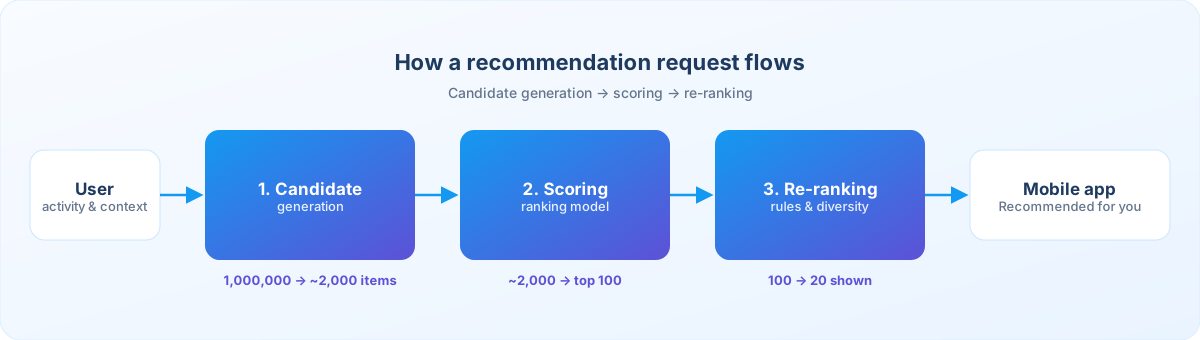
A modern recommendation pipeline can be understood in three stages. This architecture is common because scoring every item for every request becomes expensive at scale.
Candidate generation
Select a smaller group of potentially relevant items from a very large collection.
Scoring
Evaluate each candidate and assign a relevance score.
Re-ranking
Adjust the final list for freshness, diversity, business rules, or items the user has already rejected.
Why Build Recommendations Into a Mobile App?
A recommendation system can solve several product problems.
Help users discover relevant content
Users do not always know what to search for. Recommendations can introduce products, content, or services they might not find through search.
Reduce information overload
When an app contains thousands of options, personalized ranking reduces the number of items a user needs to evaluate.
Improve product discovery
For eCommerce and marketplace apps, recommendations connect users with products that match their interests.
Support content engagement
Media, education, and social apps can surface potentially relevant content to the right user.
Improve user experience
A good system reduces the effort needed to find the next useful action. The goal is not to show more recommendations, but to help users find something useful with less effort.
Plan the Recommendation: Objective and Placement
Before selecting an AI model, define the problem. The recommendation target determines the data, model, and evaluation strategy.
Step 1: Define What You Want to Recommend
Ask what exactly the system should recommend. For an eCommerce app, a useful objective is “recommend products that a user is likely to consider purchasing.” That is more useful than the vague goal “use AI to recommend products,” because it gives the engineering team something measurable to build and evaluate.
Step 2: Define the Recommendation Placement
Where will recommendations appear in the app? Different placements need different objectives, and Google’s recommendation documentation distinguishes personalized homepage recommendations from related-item recommendations. Common placements include:
- Home screen
- Product detail page
- Search results
- Cart
- Checkout
- Content feed
- User dashboard
- Post-purchase screen
- Notification
- Email or other channels connected to the app
What Apps Typically Recommend
| App type | Recommendation |
|---|---|
| eCommerce | Products |
| Streaming | Movies or videos |
| Education | Courses or lessons |
| Fitness | Workouts |
| Travel | Destinations |
| Food delivery | Restaurants or dishes |
| Marketplace | Listings |
| Social | Posts or accounts |
| Finance | Relevant educational content or services |
| Productivity | Tasks, templates, or features |
Placement Changes the Objective
| Placement | Typical label | Focus |
|---|---|---|
| Home screen | “Recommended for you” | Personal relevance, discovery, diversity |
| Product detail page | “You may also like” | Similar and complementary products |
| Cart | “Complete your purchase” | Complementary products, purchase relevance |
Collect the Right Data and Track Meaningful Events
A recommendation model is only as useful as the data available to it.
Step 3: Collect the Right Data
You need two kinds of data. User interaction events can include app opens, searches, product views, selections, saved items, add-to-cart, purchases, video starts and completions, course completions, article opens, dismissed items, and recommendation clicks.
You also need item information. For a product: ID, category, brand, price, description, attributes, availability, images, rating, and inventory status. For a video: title, category, topic, duration, language, creator, and publication date. The exact data depends on the recommendation problem.
Step 4: Build an Event Tracking Strategy
Do not collect every possible interaction. Define events around meaningful product behavior. For an eCommerce app you might track:
- product_viewed
- product_searched
- product_saved
- add_to_cart
- purchase_completed
- recommendation_impression
- recommendation_clicked
- recommendation_dismissed
For mobile measurement, Google Analytics for Firebase provides event-based analytics that can measure user interactions in an app. Log recommendation impressions, clicks, and dismissals as their own events so you can tell whether the module is helping.
Choose the Approach and Solve Cold Start
There is no single recommendation algorithm that works for every application.
Step 5: Choose the Recommendation Approach
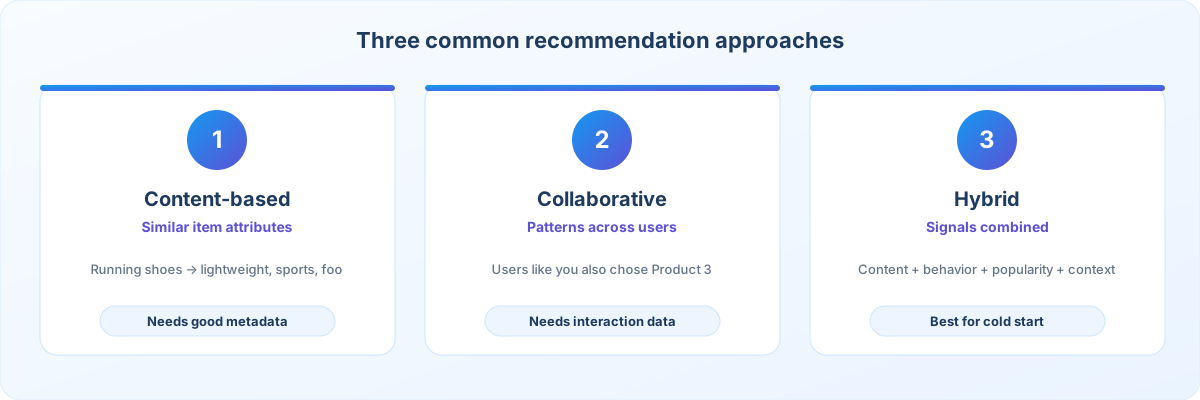
Three common approaches are content-based filtering, collaborative filtering, and hybrid recommendation. Content-based filtering uses item characteristics to recommend things similar to what a user has interacted with. Collaborative filtering uses patterns in user-item interactions. A hybrid system combines several signals so it stays flexible as data grows.
Step 6: Handle the Cold-Start Problem
Cold start is one of the biggest recommendation challenges. It appears in two forms: a new user with no history, and a new item with little interaction data. Both need a defined fallback.
Content-Based vs Collaborative vs Hybrid
| Approach | How it works | Strengths | Limitations |
|---|---|---|---|
| Content-based filtering | Recommends items similar to what the user interacted with, based on item attributes. | Works with item metadata; useful with limited user history; easy to explain; can recommend new items if metadata exists. | Can become too narrow; may repeat similar items; depends on high-quality metadata. |
| Collaborative filtering | Uses patterns in user-item interactions: if similar users liked an item, it may suit you. | Can discover unexpected relationships; needs no detailed item descriptions; captures behavior patterns across users. | Needs enough interaction data; new users and new items are hard (cold start). |
| Hybrid | Combines content, collaborative, popularity, context, and business rules into one candidate pool before ranking. | More flexible than a single method; handles cold start more gracefully. | More moving parts to build, test, and maintain. |
Content-based example: a user views running shoes. The system identifies attributes such as running, sports, footwear, men’s, and lightweight, then recommends products with similar characteristics. Collaborative example: User A interacted with Products 1 and 2; User B interacted with Products 1, 2, and 3. The system may infer that Product 3 could be relevant to User A.
Two Kinds of Cold Start
New-user cold start
- Ask for selected interests during onboarding
- Use broad popular items
- Use contextual information where appropriate
- Use content-based recommendations
- Allow users to follow categories
- Start with editorial recommendations
New-item cold start
- Use item metadata
- Use content embeddings
- Include editorial rules
- Use category-level recommendations
- Gradually test the item with relevant users
Google for Developers explains content-based filtering and collaborative filtering in more detail, including when each method fits. When the model work needs a dedicated team, AI and machine learning development covers model selection, training, and production deployment.
Generate Candidates, Score, and Re-rank
Scoring every available item for every request becomes expensive at scale, which is why the pipeline narrows the pool in stages.
Step 7: Generate Candidates
A large app might have thousands or millions of items. Running an expensive ranking model on all of them for every user is inefficient, so candidate generation narrows the pool. Google’s recommendation architecture describes this as the first stage. Candidates can come from several sources:
- Content similarity
- Collaborative filtering
- Popular items
- Trending content
- Recently viewed items
- User preferences
- Similar items
- Contextual signals
Step 8: Score and Rank the Candidates
After candidate generation, the system decides which candidates are most relevant. A ranking model can combine several factors, and scoring models can mix candidate sources with contextual features before producing a final ranking:
- User interests
- Previous interactions
- Item characteristics
- Context
- Recency
- Popularity
- Price
- Availability
- Previous recommendation response
Step 9: Add Re-Ranking and Business Rules
The highest model score should not always determine the final result. If a model returns near-identical copies of the same product, the experience is poor. Re-ranking applies extra constraints, as Google’s guidance describes:
- Diversity
- Freshness
- Inventory availability
- User exclusions
- Category balance
- Business eligibility
- Safety requirements
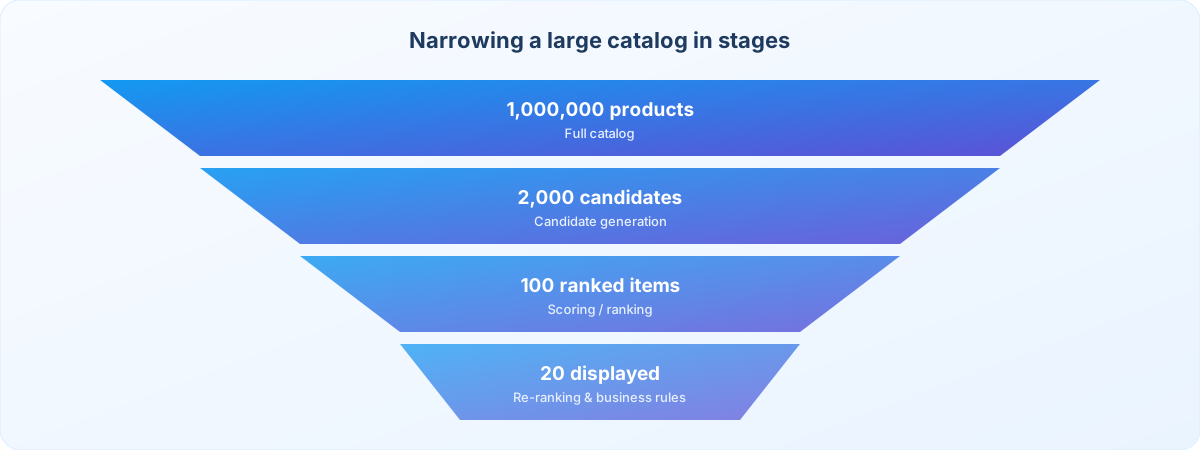
How the Pool Narrows
Google’s recommendation course describes candidate generation as the stage that narrows a large catalog, and re-ranking as the stage that adjusts the final list for diversity, freshness, and other constraints.
Design the API, Choose Models, and Shape the Mobile Experience
The recommendation algorithm is only one part of the feature. Serving, model choice, and UI all affect the result.
Step 10: Design the Recommendation API
The mobile app should request recommendations through a backend API rather than embedding the whole system in the client. A recommendation API might receive user_id, placement, context, and limit, and return item_id, score, reason, position, and metadata. The exact contract depends on the app.
Step 11: Consider Real-Time vs Batch Recommendations
Not every recommendation needs real-time calculation.
- Batch: calculate recommendations periodically (for example nightly), store the results, and let the app retrieve them. Simpler and cheaper for some apps.
- Real-time: consider current activity during the request. Useful when context matters, but adds infrastructure and latency considerations.
- Hybrid: precomputed recommendations plus real-time re-ranking.
Step 12: Select the Right Model
The right model depends on dataset size, number of users and items, interaction volume, latency requirements, the recommendation objective, available infrastructure, and team expertise. Options include:
- Popularity-based recommendations
- Content-based models
- Collaborative filtering
- Matrix factorization
- Neural recommendation models
- Embedding-based retrieval
- Deep learning ranking models
- Hybrid systems
Step 13: Use Embeddings When They Add Value
Embeddings represent users, items, queries, or other entities as vectors, so similar items sit closer together in the embedding space. The system can then use vector similarity to retrieve candidates. Google describes retrieval systems that use embeddings and nearest-neighbor techniques, which can be especially useful for large catalogs and semantic similarity.
Step 14: Design the Mobile User Experience
Useful recommendation sections include “Recommended for you,” “Because you viewed…,” “Similar products,” “Continue learning,” “You may also like,” “Popular near you,” and “Based on your interests.” Explaining why an item is recommended improves transparency, for example “Recommended because you viewed running shoes.” Also provide:
- Dismiss controls where appropriate
- Filters
- Manual search
- Clear item information
- Loading states
- Empty states
- Error handling
Embeddings turn users and items into vectors so similar items can be retrieved together. Google’s retrieval guidance covers nearest-neighbor lookup for recommendation candidates, and the embeddings crash course explains how those vectors are built. Serve the result through a backend API rather than inside the app binary. AI integration services connect that API to the rest of the product.
Evaluate, A/B Test, and Monitor the System
Evaluate the system before and after launch, and treat the model as a production system rather than a one-time feature.
Step 15: Evaluate the Recommendation System
Use offline metrics to evaluate model behavior against known datasets, and online product metrics once the system is deployed (both are listed below).
Step 16: Run A/B Tests
Compare the system against a meaningful baseline, such as popular products as the control and personalized AI recommendations as the variant. Then compare relevant outcomes. Do not conclude that the system works only because click-through rate increased; check downstream outcomes and guardrail metrics as well.
Step 17: Monitor the System After Launch
A recommendation system can degrade over time. Common reasons:
- User behavior changes
- Product catalog changes
- New content categories
- Seasonal changes
- Data pipeline failures
- Model drift
- Inventory changes
- Tracking changes
- Popularity shifts
Offline Metrics
| Metric | What it helps you understand |
|---|---|
| Precision | Share of recommended items that are relevant |
| Recall | Share of relevant items that were recommended |
| Mean Average Precision (MAP) | Ranking quality across many users |
| NDCG | Whether the most relevant items appear near the top |
| AUC | How well the model separates relevant from irrelevant items |
| Coverage | How much of the catalog the system can recommend |
Online Product Metrics
| Metric | What it helps you understand |
|---|---|
| Recommendation click-through rate | Whether users select recommended items |
| Conversion and purchase rate | Whether recommendations support the intended action |
| Add-to-cart rate | Whether recommended products create purchase intent |
| Content completion | Whether recommended content is actually consumed |
| Session engagement and retention | Whether users keep coming back |
| Revenue per user | Commercial impact of the feature |
| Recommendation dismissal and user feedback | Whether users reject or dislike suggestions |
Illustrative A/B Test Result
| Metric | Control (popular products) | AI variant (personalized) |
|---|---|---|
| CTR | 4.2% | 5.1% |
| Add to Cart | 2.1% | 2.7% |
| Purchase | 1.1% | 1.5% |
These numbers are only an illustrative example; actual performance must come from your own application data. Firebase A/B Testing is one way to compare a recommendation variant against a control inside a mobile app. To connect this to a wider measurement plan, read how to measure mobile app success with 15 KPIs, and see our post-launch roadmap for what to monitor after release.
A Practical Architecture for a Mobile App
A production architecture might look like this. Scale it to the application’s actual requirements.
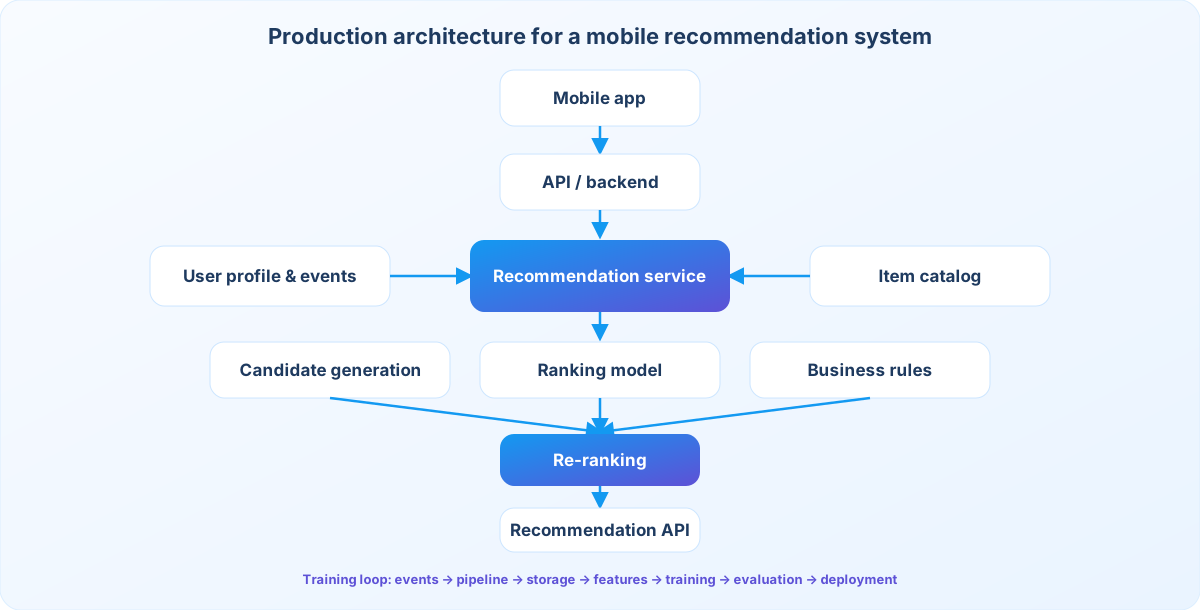
Behind the serving layer, you will also need a pipeline that turns events into a deployed model:
The API and data pipeline usually sit in a backend, which is part of web application development, even when the user only sees the mobile app. When traffic and catalog size grow, plan capacity early. Our guide on scaling a mobile app toward one million users covers the infrastructure side of that growth.
Example: Recommendations for an eCommerce Mobile App
Suppose you are building an online shopping app with 100,000 products.
Goal
Recommend products users are likely to find relevant, in an app with 100,000 products.
Data
Track product_viewed, product_searched, product_saved, add_to_cart, purchase_completed, recommendation_clicked, and recommendation_dismissed.
Candidate sources
Similar products, user history, popular products, category preferences, and recently viewed items.
Ranking
Score candidates on user relevance, product relevance, recent behavior, availability, and business constraints.
Re-ranking
Apply diversity, inventory availability, user exclusions, and category limits.
Mobile output
Display a “Recommended for You” section with a small set of relevant products.
Measurement
Track impressions, clicks, product views, add-to-cart events, purchases, revenue influenced by recommendations, and dismissals.
Shopping apps are a common first use case because the catalog is large and each action (view, save, cart, purchase) is a clear signal. See how that kind of product is typically built on our eCommerce app development page.
Privacy and Security Considerations
Recommendation systems often process behavioral information such as search history, viewing history, purchases, saved items, location, preferences, and device or session data. Only collect and process what is appropriate for the intended feature and applicable privacy requirements.
Data minimization
Do not collect unnecessary information simply because it might improve recommendations. Collect only what suits the intended feature and applicable privacy requirements.
Consent and transparency
Where required, provide appropriate disclosures and user controls.
Access control
Users should only receive recommendations based on data they are authorized to access.
Secure APIs
The recommendation endpoint should use appropriate authentication and authorization.
Sensitive information
Avoid using sensitive personal attributes for personalization unless there is a clear, lawful, and appropriate reason and the implementation meets applicable requirements.
Data retention
Define how long recommendation-related event data needs to be retained.
Privacy should be part of the architecture rather than an afterthought. Requirements vary by jurisdiction and use case. On mobile, start with Apple’s App Privacy Details and Android privacy guidance. If the app serves people in the EU, review the European Commission’s data protection overview. Secure the recommendation API and the data it uses with controls aligned to the OWASP Mobile Top 10.
Common Recommendation System Problems
| Problem | What happens | Solution |
|---|---|---|
| Poor-quality data | Missing or incorrect events teach the model inaccurate behavior. | Validate event tracking and data pipelines. |
| Popularity bias | The system keeps recommending already-popular items. | Balance relevance with diversity and exploration. |
| Filter bubbles | Users repeatedly see very similar content. | Introduce controlled diversity and discovery. |
| Cold start | New users or items have little interaction history. | Combine preferences, content information, popularity, and other appropriate signals. |
| Over-personalization | Recommendations become too narrow. | Maintain variety and provide manual controls. |
| High latency | Complex processing slows the mobile experience. | Use caching, candidate precomputation, efficient retrieval, and appropriate model serving. |
| Optimizing the wrong metric | Clicks rise while meaningful outcomes fall. | Align the objective with the actual product goal. |
How Much Does It Cost to Build an AI Recommendation System?
There is no single price. The cost depends on:
A basic feature based on explicit preferences and rules is very different from a large-scale real-time platform using machine-learning models and vector retrieval. Before estimating development cost, define the items below. Use the mobile app development cost guide together with how to estimate app development scope before you request a quote.
Should You Build or Buy a Recommendation System?
The right choice depends on total cost, control, scalability, data requirements, and product importance, not simply on comparing technology prices.
Build your own when
- Recommendation logic is central to the product.
- You need significant customization.
- You have suitable engineering and ML expertise.
- Your data and scale justify custom infrastructure.
- Recommendation quality is a major competitive factor.
Consider managed technology when
- You need to launch quickly.
- Your requirements are relatively standard.
- You want to reduce infrastructure management.
- You do not have a dedicated ML engineering team.
Consider a hybrid when
- You need custom business rules.
- You want managed model infrastructure.
- You need your own data and application integrations.
- You want to control the final ranking layer.
For the wider decision, see build vs buy for custom mobile apps and when a startup should move from MVP to full product. If the choice depends on data readiness and model scope, AI consulting can frame that decision before engineering starts.
When Should a Mobile App Use AI Recommendations?
It is particularly useful when
- The app has a large number of items.
- Users have different interests.
- Users need help discovering content.
- Search alone is not sufficient.
- User interactions generate meaningful signals.
- Recommendations can improve a measurable product outcome.
It may be unnecessary when
- The app has only a small number of items.
- Users follow the same workflow.
- There is insufficient data.
- Simple rules solve the problem.
- The added complexity creates no meaningful user value.
Do not add machine learning simply because it is available. A recommendation system should solve a real product problem.
10-Step AI Recommendation System Checklist
Before development, confirm that you have:
If several are missing, the project may need more product and data planning before model development begins.
How Weapplinse Can Help With Recommendation Features
Planning an app with personalized discovery? Define the recommendation use case, available data, expected scale, and success metrics before choosing technology. Weapplinse supports this with mobile app development, web application development, AI services and solutions, backend and API work, analytics, and QA. Short, iterative releases work best; see our overview of agile mobile development. If you need extra capacity, you can hire dedicated developers, and US-based teams can start from our mobile app development services in the USA page.
Final Thoughts: Start With the User Problem, Then Build the System Around It
Building an AI-powered recommendation system takes more than selecting a machine-learning model. The strongest implementations start with a clearly defined user problem, then build the data, recommendation logic, backend architecture, mobile experience, and measurement system around it. The pipeline in short: collect relevant data, generate candidates, score them, apply business rules, re-rank, deliver, measure, and improve. For smaller apps, simple logic may be enough; as the catalog, user base, and interaction data grow, collaborative filtering, embeddings, neural models, and hybrid ranking become useful. The objective stays the same: help users discover something relevant without adding unnecessary complexity to their experience.
Ready to define your recommendation use case, data, and success metrics? Contact the Weapplinse team to review your requirements and implementation options.
Related Guides & Resources
Weapplinse guides
- How AI Personalization Improves Mobile App UX
- AI Chatbot vs Traditional Chatbot for Mobile Apps
- 15 KPIs to Measure Mobile App Success
- Mobile App Development Cost in the USA (2026)
- How to Estimate Mobile App Development Scope
- Build vs Buy: Custom Mobile App
- MVP Software Development Guide
- What to Do After Launching a Mobile App
External resources
- Google for Developers: Recommendation Systems
- Candidate generation
- Content-based filtering
- Collaborative filtering
- Retrieval and nearest-neighbor search
- Re-ranking
- Embeddings (Machine Learning Crash Course)
- Firebase Analytics documentation
- Firebase A/B Testing
- Apple App Privacy Details
- Android privacy
- EU data protection overview
- OWASP Mobile Top 10
Frequently Asked Questions
An AI-powered recommendation system uses machine learning or related intelligent techniques to identify, score, and rank items that may be relevant to a user.
Start by defining what you want to recommend and the business or user problem it solves. Then collect relevant interaction and item data, select a recommendation approach, build candidate generation and ranking, expose the recommendations through a backend API, integrate them into the mobile UI, and measure the results.
Common approaches include content-based filtering, collaborative filtering, matrix factorization, embedding-based retrieval, neural recommendation models, and hybrid systems.
Depending on the use case, you may need user interactions, item metadata, search behavior, purchases, views, saves, ratings, contextual information, and recommendation feedback. The required data depends on the recommendation objective.
Cold start occurs when the system has too little information about a new user or item to make personalized recommendations. Common solutions include explicit preferences, popular items, content-based recommendations, and item metadata.
Yes. Rule-based, popularity-based, or manually curated systems can work well, particularly for smaller applications. Machine learning becomes more useful when recommendation complexity and data volume justify it.
Content-based filtering is useful when item characteristics are strong and user history is limited. Collaborative filtering works well when you have enough user-item interaction data. A hybrid system can combine their strengths.
It helps users discover relevant products, content, services, or features without searching through large collections. The quality of the experience depends on relevance, diversity, transparency, and the user’s ability to control it. For the wider experience, see how AI personalization improves mobile app user experience.
The cost depends on data availability, model complexity, number of users and items, real-time requirements, infrastructure, integrations, testing, and ongoing maintenance. A basic recommendation feature can be considerably simpler than a large-scale real-time platform. For a broader budget view, see the mobile app development cost guide.
Use a combination of offline model metrics and online product metrics, such as precision, recall, NDCG, click-through rate, conversion rate, retention, task completion, revenue, and user feedback.
Personalization is the broader concept of adapting an experience to an individual user. A recommendation system is one technology used to personalize which content, products, or actions are presented to that user.


