


AI Agents vs AI Chatbots: What Is the Difference?
AI agents vs AI chatbots: An AI chatbot primarily communicates with users and provides information, while an AI agent can pursue a goal, use connected tools, execute multi-step workflows, and evaluate the results. Chatbots are generally better for conversational support, while AI agents are more suitable for complex business automation.
Key takeaways:
For example, a chatbot might answer, “What is the status of my order?” An AI agent could check the order-management system, identify the latest status, determine whether there is a delay, update the customer, and start an appropriate workflow if a problem is detected.
What Is an AI Chatbot?
An AI chatbot is a software application that uses artificial intelligence to communicate with users through natural-language conversations. Modern AI chatbots can understand questions, maintain conversational context, retrieve information, generate responses, and sometimes connect to business systems. Traditional chatbots relied on predefined rules and decision trees. Modern ones use large language models and retrieval systems to handle a much broader range of questions.
A chatbot can be used through:
- Website chat
- Mobile applications
- Customer portals
- Messaging platforms
- Internal business tools
- Support interfaces
For instance, a customer could ask, “Can I change the delivery address for my order?” The chatbot could explain the company’s policy or, if integrated with an order system, guide the customer through the available options. The primary purpose of a chatbot is conversation and assistance. For a mobile-specific view, see our guide to AI chatbot vs traditional chatbot for mobile apps.
What Is an AI Agent?
An AI agent is an AI-powered system designed to work toward a specific goal by reasoning about tasks, using tools, taking actions, and responding to changing conditions. Instead of only generating a response, an agent can determine what needs to happen next.
Consider a customer who writes, “My order arrived damaged. Please arrange a replacement.” A chatbot might explain the replacement policy and ask the customer to submit a form. An AI agent could potentially:
Identify the customer
Match the request to a verified account.
Retrieve the order
Pull the order record from the order-management system.
Check the order status
Confirm delivery and shipment details.
Review the replacement policy
Look up the rules that apply to this product and situation.
Determine eligibility
Decide whether the request qualifies.
Create a replacement request
Raise the request in the connected system.
Update the order-management system
Keep the record accurate and auditable.
Notify the customer
Send a clear confirmation of what happens next.
Escalate if human approval is required
Route exceptions to an employee instead of guessing.
The important distinction: the agent is not limited to generating a conversational answer. It can take part in a multi-step workflow.
AI Agent vs AI Chatbot: The Core Difference
An AI chatbot primarily helps users through conversation, while an AI agent can use conversation as an interface for completing tasks.
| Area | AI Chatbot | AI Agent |
|---|---|---|
| Primary purpose | Conversation and assistance | Goal-oriented task execution |
| Interaction | Usually user-driven | User-driven or workflow-driven |
| Autonomy | Lower | Higher |
| Tool usage | Possible | Core capability |
| Multi-step workflows | Limited to moderate | Strong |
| System integrations | Optional | Usually important |
| Decision-making | Mostly response-level | Can involve workflow decisions |
| Actions | Usually limited | Can execute multiple actions |
| Best suited for | FAQs, support, guidance | Automation and complex workflows |
| Human involvement | Often higher | Can be reduced with proper controls |
This does not mean every agent is fully autonomous or every chatbot is simple. The technologies overlap: an advanced chatbot can use APIs and tools, and an agent can have a conversational interface. The difference is how the system operates and how much responsibility it has for completing a task.
How Do AI Chatbots Work?
A customer asks a question
The user types or speaks a message in the chat interface.
The application receives the message
The front end passes the message and session context to the chatbot service.
The AI system interprets the request
The model works out what the customer wants to know or do.
Relevant information is retrieved
The system searches knowledge bases, documents, or connected data.
The model generates a response
The answer is written using the retrieved information and the conversation context.
The response is displayed
The customer reads the answer and can ask a follow-up question.
A more advanced chatbot may also use:
- Retrieval-augmented generation (RAG)
- Business APIs
- Customer databases
- Authentication
- Conversation history
- Knowledge bases
- Human handoff
These additions make responses more useful and contextual, but the system generally remains centered around the conversation.
How Do AI Agents Work?
An AI agent adds components for planning and action to the basic chatbot flow.
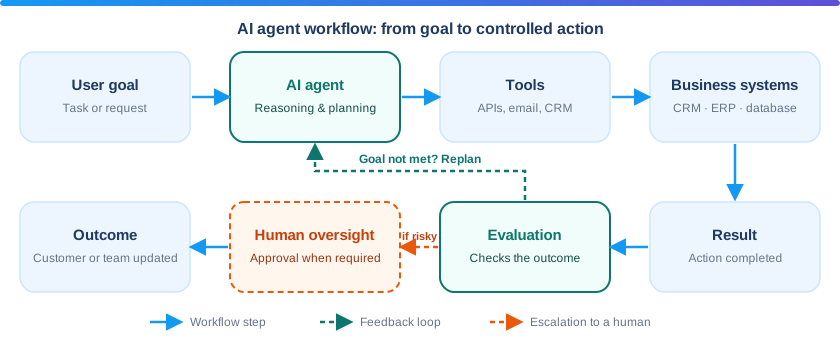
The user provides a goal
For example: “Prepare the weekly sales report and send it to management.”
The agent interprets the objective
It identifies what a successful result looks like.
It determines the required steps
The agent plans which actions must happen and in what order.
It selects appropriate tools
CRM, email, database, calendar, ticketing, or internal APIs.
It executes actions
Tool calls are made within the permissions it has been given.
It checks the results
The agent validates whether each action worked as expected.
It decides whether more steps are needed
If the goal is not yet met, it continues or changes approach.
It reports or escalates
It returns the outcome, or asks a human for help or approval.
Tools an agent can use include:
- CRM systems
- Payment APIs
- Email systems
- Inventory platforms
- Databases
- Calendar systems
- Internal APIs
- Analytics platforms
- Document systems
- Ticketing systems
The agent therefore becomes an orchestration layer between AI reasoning and business systems.
AI Agents vs AI Chatbots for Business Automation
The most important question is not which technology is more advanced. It is: how much of the business process actually needs to be automated? Take a customer-support department.
A chatbot can answer
Questions- What are your business hours?
- What is your refund policy?
- Where can I find my invoice?
- How do I reset my password?
- What payment methods do you accept?
An AI agent can handle
Workflows- Checking an account
- Creating a support ticket
- Updating customer information
- Scheduling an appointment
- Processing a qualified request
- Retrieving data from several systems
- Sending notifications and escalating exceptions
The difference is the move from answering questions to performing workflows.
When Is an AI Chatbot Better?
A chatbot is often the better option when your primary requirement is communication rather than complex automation.
Customer FAQs
Low complexityIf customers frequently ask repetitive questions, a chatbot can give immediate answers without a human handling every interaction. Typical topics are pricing, product information, shipping policies, business hours, service information, and account instructions.
Website Lead Qualification
Low to mediumA chatbot can ask visitors about the service they want, their business type, project requirement, and preferred timeline. The collected information can then be sent to a CRM or sales team.
Customer Support
Low to mediumChatbots can handle common support requests before transferring complex cases to human representatives. This can reduce the volume of repetitive support conversations.
In-App Assistance
MediumMobile applications can use AI chatbots to help users understand features, find information, or complete simple tasks. For businesses already planning conversational AI, a chatbot is a practical starting point.
Personalized chat experiences can go further: see how AI personalization improves mobile app user experience.
When Is an AI Agent Better?
AI agents become more useful when the business problem involves multiple steps, tools, decisions, or systems.
Sales Automation
Medium to highAn agent can research leads, enrich customer information, update CRM records, draft personalized outreach, schedule meetings, follow up with prospects, and summarize conversations. Human approval can remain part of the process for important actions.
Customer Service Automation
HighAn agent can coordinate multiple systems during a support workflow: customer request, account lookup, order lookup, policy verification, action, and notification. This is far more than generating a conversational response.
Appointment Scheduling
MediumThe agent understands the customer’s requirements, checks availability, identifies suitable time slots, books the appointment, updates the calendar, and sends confirmation. It completes the workflow instead of only discussing it.
Finance and Operations
HighAgents can help with invoice processing, expense classification, document extraction, payment follow-ups, report preparation, and internal approvals. Because financial workflows carry real consequences, add approval controls instead of giving an AI unrestricted authority.
Internal Business Operations
Medium to highAn operations agent can retrieve sales data, calculate metrics, generate and format a report, and send it through an approved communication system. This is closer to business-process automation than conventional chatbot functionality.
Agent decisions also depend on good data. See how an AI-powered recommendation system supports decision-driven workflows.
AI Agents vs AI Chatbots: A Practical Example
Imagine an online retail company.
Chatbot approach
“Where is my order?”- Retrieves the order status
- Replies: “Your order is currently in transit and is expected to arrive tomorrow.”
- A straightforward conversational task
AI agent approach
“My order is late. Please check what happened and arrange the best available solution.”- Retrieve the order.
- Check shipment information.
- Identify the delivery issue.
- Review company policies.
- Determine available options.
- Create a replacement or refund request if authorized.
- Update the customer.
- Escalate the case if it falls outside predefined rules.
The second scenario requires goal execution and system interaction, which is where an agent can provide more value.
Do AI Agents Replace Chatbots? Using Both Together
No. In many business applications they work together: the chatbot provides the conversational interface and the agent manages complex tasks.
Say a customer writes, “Can you reschedule my appointment for next week?” The chatbot understands the request and passes the task to an agent. The agent accesses the scheduling system, checks availability, identifies suitable slots, reschedules the appointment, updates the database, and sends confirmation. The customer still sees a simple conversation while the system runs a multi-step workflow.
AI chatbot + AI agent architecture
For larger applications, separating conversational and task-execution responsibilities gives a clearer architecture.
This architecture lets businesses combine natural-language interaction with controlled automation. Voice is another interface option: see voice AI in mobile apps.
Key Factors to Consider Before Choosing
Before implementing a chatbot or an agent, evaluate the actual business process. Ask these five questions.
Is the problem conversational?
If users mainly need answers, an AI chatbot may be sufficient.
Does the system need to perform actions?
If the AI must update records, call APIs, create transactions, or coordinate several systems, an agent may be more appropriate.
How many steps are involved?
A single-step workflow may not require an agent. A workflow with several dependent steps is a stronger candidate.
What happens when something goes wrong?
Define error handling, retry rules, escalation, human approval, logging, and rollback procedures.
How sensitive is the information?
Financial, personal, medical, legal, or confidential data needs stronger security and governance.
AI Agent and AI Chatbot Implementation Challenges
AI agent challenges
Agents offer more automation, but greater autonomy introduces additional risk.
Organizations should apply:
- Least-privilege access
- Authentication
- Authorization
- Audit logging
- Input validation
- Secure API communication
- Tool-level permissions
For governance and security guidance, review the NIST AI Risk Management Framework, the OWASP Top 10 for LLM Applications, and the OWASP API Security Project.
AI chatbot challenges
Chatbots are generally simpler than autonomous agents, but they still need careful implementation. Common challenges include:
A chatbot should always have a clear fallback path for when it cannot confidently answer a question.
What Costs More: AI Agents or AI Chatbots?
There is no universal fixed price for either. However, AI agent projects can require more development effort than basic AI chatbot implementations, because they often involve additional integrations, workflow logic, permissions, monitoring, testing, and business-system connectivity.
The overall project cost can depend on:
A simple FAQ chatbot can be relatively straightforward. A production agent that interacts with CRM, payment, inventory, and support systems needs substantially more architectural planning. Define the required workflows before requesting estimates. Our guide on how to estimate mobile app development scope before getting a quote can help, and the mobile app development cost guide covers wider budget benchmarks.
How to Start With AI Automation
Businesses do not need to start with a fully autonomous agent. A staged approach reduces implementation risk.
Stage 1: Identify repetitive work
Find processes where employees repeatedly answer the same questions, search the same systems, enter the same data, generate similar reports, schedule appointments, or process routine requests.
Stage 2: Determine whether conversation is required
If users need to communicate naturally with the system, introduce a chatbot interface.
Stage 3: Identify actions
Document which actions the AI should perform.
Stage 4: Connect business systems
Integrate only the systems the workflow requires.
Stage 5: Add approval controls
High-impact actions should require validation or human approval where appropriate.
Stage 6: Test with real scenarios
Test normal requests, ambiguous requests, invalid requests, missing information, API failures, unauthorized actions, and unexpected responses.
Stage 7: Monitor performance
Track both AI quality and business outcomes.
Treat the first release as a test. Our guide on when to move from MVP to full product explains how to decide when to scale.
Metrics to Measure AI Automation
Do not judge an AI system only by the number of conversations it handles. Track quality, task results, and business outcomes.
Chatbot metrics
- Conversation completion rate
- Answer accuracy
- User satisfaction
- Escalation rate
- Response time
- Containment rate
AI agent metrics
- Task completion rate
- Successful workflow rate
- Human intervention rate
- Tool-call success rate
- Error rate
- Average task duration
- Cost per completed task
- Automation rate
Business metrics
- Support cost reduction
- Lead conversion
- Employee productivity
- Processing time
- Customer satisfaction
- Revenue impact
- Operational efficiency
Ultimately, business outcomes are the most important measurement.
Which Should Your Business Choose: AI Agent or AI Chatbot?
A simple decision framework can help.
Choose a chatbot when
- Customers mainly need information.
- The workflow is mostly conversational.
- You want to improve customer support.
- Users need guidance through an application.
- The required actions are limited.
- You want to start with conversational AI.
Choose an agent when
- The AI needs to complete multi-step tasks.
- Several business systems must be connected.
- The workflow requires tool usage.
- Automation matters more than conversation alone.
- The system needs to make workflow-level decisions.
- Human intervention should be reduced for appropriate tasks.
Consider both when
- Users need a conversational interface.
- The underlying process requires multiple actions.
- The application must communicate with several business systems.
In many real-world applications, chatbot vs agent is not an either-or decision. The chatbot can become the interface, while the agent becomes the automation engine.
For further technical background, see the Google Cloud overview of AI agents, IBM’s explanation of AI agents, and Microsoft Azure’s introduction to AI agents.
How Weapplinse Can Help With AI Chatbots and Agents
Successful AI automation needs coordination across workflow design, UX, backend engineering, AI integration, security, and QA. Weapplinse helps businesses define the scope and build AI functionality through AI services and solutions and mobile app development services, with supporting web application development and API work.
Start with one focused workflow, such as an FAQ chatbot or a single agent-driven task with human approval, then expand. Need extra engineering capacity? You can hire dedicated developers.
Final Takeaway: Match Autonomy to the Process
AI chatbots and AI agents solve related but different problems. Chatbots are primarily conversation-focused. Agents are primarily task- and goal-focused. If you need to answer customer questions, provide product information, qualify leads, or guide users, a chatbot may be the right starting point. If you need to automate multi-step workflows, interact with several systems, execute actions, and reduce manual operational work, an agent may provide greater value.
The objective is not to use the most advanced AI available. It is to automate the right business process with the appropriate level of autonomy, security, and control. Contact the Weapplinse team to scope your AI automation.
Related Guides & Resources
Weapplinse guides
Frequently Asked Questions
No. An AI chatbot is primarily designed for conversational interaction, while an AI agent is designed to pursue goals, use tools, and execute tasks. However, an AI agent can include a chatbot-style conversational interface.
Not always. AI agents are more appropriate for complex, multi-step automation, while chatbots are often better for answering questions, providing guidance, and handling conversational support.
A chatbot can be extended with tools, APIs, workflow logic, planning capabilities, and controlled actions. At that point, the system can take on agent-like functionality.
Yes. Agents can be connected to business systems through APIs and other controlled integrations. The available capabilities depend on the systems, APIs, permissions, and architecture.
The cost depends on the complexity of the workflow. Agents requiring multiple integrations, sophisticated automation, security controls, monitoring, and human approval workflows generally require more development effort than basic chatbots.
A startup should begin with the simplest technology that solves the actual business problem. If the main requirement is customer communication, a chatbot may be sufficient. If the core requirement is automating a multi-step workflow, an agent may be more appropriate.
AI agents can automate specific tasks and workflows, but complete employee replacement should not be assumed. Businesses still need human oversight for exceptions, sensitive decisions, quality control, and responsibilities that require judgment or accountability.
They can be implemented safely with appropriate controls, but greater autonomy increases the importance of security, permissions, monitoring, validation, and human oversight.
Yes, for suitable workflows. Agents can retrieve data, call connected tools, update records, send notifications, and escalate exceptions, usually within permissions and approval rules the business defines.
Use an AI agent when the AI must complete multi-step tasks, connect several business systems, use tools, and make workflow-level decisions, and when reducing manual operational work matters more than conversation alone.


