


Should Your Business Invest in AI Agents in 2026?
Should your business invest in AI agents in 2026? Yes, if you have repetitive, multi-step workflows that can be automated through reliable data sources and approved system integrations. AI agents can support customer service, sales operations, document processing, and internal workflows. Before deploying one, evaluate implementation costs, security risks, human oversight, and measurable ROI.
Key takeaways:
What Are AI Agents?
AI agents are software systems that work toward specific objectives by interpreting information, selecting actions, using connected tools, and evaluating results. Conventional automation follows predefined instructions. An agent uses AI models to interpret a request and decide the appropriate steps inside an approved workflow. For vendor and industry background, see Google Cloud’s overview of AI agents and IBM’s explanation of AI agents.
Suppose an employee asks: “Find all unpaid invoices from this month, prepare a summary, and send it to the finance manager.” An AI agent could potentially:
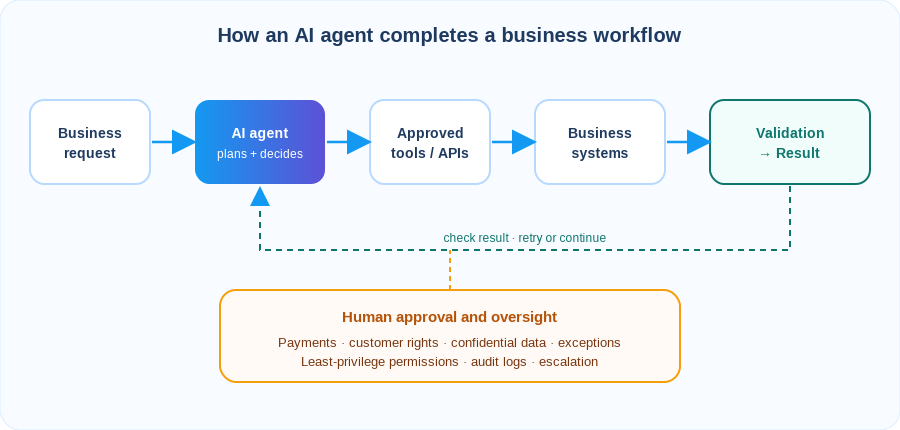
Access an authorized system
Connect to the accounting system with approved credentials.
Retrieve invoice records
Pull this month’s invoices through the API.
Identify unpaid invoices
Filter records with outstanding payments.
Organize the information
Group and sort the relevant data.
Prepare a summary
Write a short report for the finance manager.
Request approval if required
Pause for a human check where the policy demands it.
Send the report
Deliver it through an approved communication system.
The agent is not simply generating an answer. It is coordinating several actions to complete a business objective. Agents can draw on:
- Large language models (LLMs)
- APIs and external tools
- Business databases
- Retrieval-augmented generation (RAG)
- Workflow orchestration
- Memory and contextual information
- Authentication and permission systems
- Monitoring and evaluation
The level of autonomy depends on the architecture, permissions, and business rules set during implementation.
Why Are Businesses Considering AI Agents in 2026?
Businesses are exploring AI beyond content generation and conversation. Most already run software for sales, support, finance, inventory, and marketing, yet employees still move information between systems by hand. Agents offer a way to connect those activities through goal-oriented workflows. A sales employee, for example, might need to:
Introducing an agent does not automatically improve a process. Identify which activities suit automation, set clear rules for exceptions, and base the business case on measurable operational improvements, not the technology’s novelty.
10 Business Benefits of Investing in AI Agents
Reduce Repetitive Manual Work
Many processes require employees to collect information, update records, prepare documents, or send notifications. Agents can automate suitable parts of those workflows, freeing people for work that needs judgment and expertise.
- Creating support tickets
- Categorizing incoming requests
- Preparing routine reports
- Extracting information from documents
- Updating approved CRM fields
- Sending routine notifications
Keep in mind: The real benefit depends on how much of the workflow can be automated reliably.
Improve Customer Support Operations
An agent connected to authorized systems can do more than answer questions. It can understand the issue, retrieve account information, check an order, apply the relevant policy, create a ticket, and escalate complex cases to a human.
- Understand the customer’s issue
- Retrieve account information
- Check an order or service request
- Apply the business policy
- Create a ticket or approved action
- Escalate complex cases
Keep in mind: Always provide a human escalation path for complaints, sensitive information, and ambiguous requests.
Improve Lead Management and Sales Operations
Sales teams spend considerable time managing customer information and coordinating follow-ups. An agent can organize an inquiry and notify the right representative the moment it arrives.
- Collecting lead information
- Categorizing inquiries
- Enriching CRM records from approved sources
- Preparing meeting summaries
- Drafting follow-up messages
- Scheduling appointments
Keep in mind: Accepting commercial terms or sending sensitive messages should stay behind approval controls.
Connect Multiple Business Systems
Without integrations, employees move information between CRM, accounting, inventory, and communication tools by hand. An agent can act as an orchestration layer across them through APIs and approved permissions.
- Customer order → Inventory lookup → Availability check → Order update → Customer notification
Keep in mind: Most valuable when several systems must work together.
Support Faster Information Retrieval
Employees lose time searching documents, policies, project records, and databases. An agent connected to approved knowledge sources can retrieve and summarize what they need.
- Searching internal documentation
- Finding customer records
- Summarizing project updates
- Retrieving product information
- Preparing management reports
- Locating support procedures
Keep in mind: The agent must respect existing access permissions and never expose data to unauthorized users.
Support Operations Beyond Working Hours
With the right infrastructure, an agent can receive a service request overnight, categorize it, retrieve information, and create a ticket.
- Overnight ticket creation
- After-hours request triage
- Automatic status updates
Keep in mind: Some actions still require human availability. Define which workflows can run independently and which must wait for review.
Improve Workflow Consistency
Manual processes vary by employee, workload, and available information. A well-designed agent follows the same approved steps every time, such as extracting invoice details and checking required fields.
- Same steps for every invoice
- Required-field checks
- Records prepared for review
Keep in mind: Consistency still depends on data quality, validation, workflow design, and monitoring.
Support Data-Driven Decisions
Agents can gather information from approved sources and prepare summaries that help teams understand business activity.
- Sales performance summaries
- Customer feedback analysis
- Inventory reporting
- Operational exception reports
- Project status updates
- Support request trends
Keep in mind: Do not treat an agent as an unquestionable source of truth. Validate important calculations against the underlying systems.
Improve Application Experiences
Agents can be built into websites, mobile apps, and customer portals. A travel app could help users compare options and coordinate booking steps, while a fitness app could manage schedules and retrieve activity data.
- Customer-facing mobile apps
- Web portals
- In-app task completion
Keep in mind: This makes agents relevant to digital products, not only internal operations.
Support Business Growth
As requests, transactions, and reports multiply, agents can absorb suitable repetitive work without every task being handled manually.
- Handling higher request volumes
- Scaling routine reporting
- Absorbing repetitive back-office work
Keep in mind: Automation does not remove the need for capacity planning, data quality, and exception handling.
Agents can also power customer-facing features, such as AI-powered personalization, AI recommendation systems, and voice AI in mobile apps.
Which Business Processes Are Suitable for AI Agents?
Not every activity needs an agent. The strongest candidates involve repeated steps, accessible information, clear objectives, and actions that can be validated.
| Business department | Potential AI agent application |
|---|---|
| Customer support | Request classification and ticket management |
| Sales | Lead organization and CRM updates |
| Marketing | Campaign reporting and content workflow assistance |
| Finance | Invoice extraction and reconciliation preparation |
| Human resources | Employee query assistance and document workflows |
| Operations | Task coordination and status reporting |
| eCommerce | Order inquiries and inventory-related workflows |
| Healthcare administration | Appointment coordination and administrative support |
| Education | Student query handling and administrative assistance |
| Logistics | Shipment updates and exception reporting |
These are potential applications, not guaranteed outcomes. Evaluate each use case against its data, integration, compliance, and approval requirements.
AI Agents vs Traditional Automation
Traditional automation follows predefined rules, for example: “When a customer submits a form, send a confirmation email.” An AI agent can interpret a more flexible request and coordinate several tools to reach a broader goal.
| Factor | Traditional automation | AI agent |
|---|---|---|
| Workflow | Predefined rules | Goal-oriented execution |
| Input | Structured triggers and conditions | Can interpret natural-language requests |
| Decision-making | Rule-based | AI-assisted decisions |
| Tool usage | Preconfigured integrations | Can select from approved tools |
| Flexibility | Best for predictable processes | Can handle some variable workflows |
| Monitoring | Rule and execution monitoring | Requires model, tool, and workflow monitoring |
| Best suited for | Repetitive predictable tasks | Multi-step tasks with variable inputs |
Traditional automation is often more predictable and less complex for straightforward processes. In many businesses, combining rule-based automation with AI agents is more practical than replacing every workflow. If your need is mainly conversation, a chatbot may be enough: see AI chatbot vs traditional chatbot for mobile apps.
How Much Does It Cost to Implement AI Agents in 2026?
There is no universal price for an AI agent. Cost depends on use-case complexity, the AI model, the number of integrations, security requirements, expected usage, and the level of autonomy. A basic internal assistant and a production agent connected to several systems have very different budgets.
Development and Implementation Costs
An agent with a few approved tools needs less effort than one coordinating several enterprise systems.
- Business process analysis
- AI architecture planning and model selection
- Prompt and workflow design
- API development and database integration
- Tool configuration and user interface
- Authentication, authorization, testing, and deployment
AI Model and API Usage Costs
Most agents call external models through APIs. Frequent interactions, long context windows, and complex workflows raise usage costs. Test models on representative tasks instead of choosing by advertised capability.
- Input and output tokens
- Model selection
- Number of requests
- Additional model capabilities
Integration Costs
Connecting to existing systems is often a large share of the work. Legacy systems and limited APIs increase effort.
- CRM software
- Email and calendar services
- Customer databases
- Internal reporting tools
Infrastructure Costs
Requirements depend on expected workload and deployment approach.
- Cloud hosting
- Database services and storage
- Logging and monitoring
- Background processing
Ongoing Maintenance Costs
An unmonitored agent can keep producing incorrect or outdated results after a successful launch.
- Model and API usage
- Integration and security updates
- Workflow adjustments
- Evaluation, testing, and error investigation
Cost comparison by project complexity
| Implementation type | Typical scope | Relative investment |
|---|---|---|
| Basic AI assistant | Answers questions using approved knowledge sources | Lower |
| Single-workflow agent | Completes a limited workflow using a few tools | Moderate |
| Multi-system agent | Coordinates several applications and business processes | Higher |
| Enterprise agent platform | Multiple agents, complex permissions, monitoring, and governance | Substantial |
These are relative complexity categories, not market quotations. Define your workflows first, then request estimates. Our guide on how to estimate development scope before getting a quote helps, and the mobile app development cost guide and ways to reduce development costs without compromising quality cover wider budgeting.
How to Calculate the Potential ROI of AI Agents
Start by calculating the current cost of the manual process. Then estimate how much of it an agent can reliably automate and subtract the cost of running it. Here is a worked example.
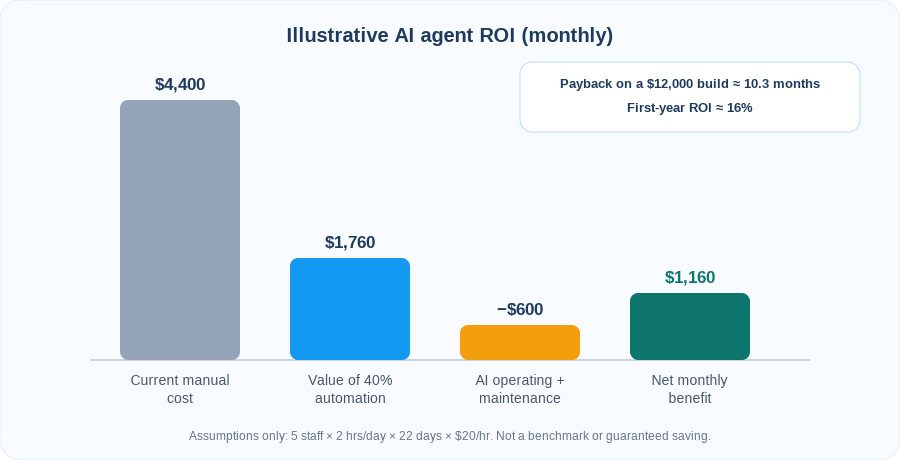
1. Current monthly cost: 5 × 2 × 22 × $20 = $4,400
2. Value of 40% automation: $4,400 × 40% = $1,760
3. Minus monthly AI operating and maintenance cost ($600): $1,760 − $600 = $1,160 net per month
4. Payback on a $12,000 build: $12,000 ÷ $1,160 ≈ 10.3 months
5. First-year ROI: ($13,920 − $12,000) ÷ $12,000 = 16% Illustrative calculation only. All figures are assumptions, not an industry benchmark or a guaranteed saving.
Net financial benefit = Measurable financial value generated − Total AI-related costs
Include initial implementation, recurring model usage, integrations, infrastructure, maintenance, and human review. Also ask whether the released employee time can be redirected to productive work. Do not treat every automated task as a cash saving: productivity gains, added capacity, and actual operating-expense reductions are different business outcomes. For a similar approach applied to a whole product, see how to calculate the break-even point for a mobile app.
Risks of Investing in AI Agents and How to Reduce Them
Agents can interact with business systems and take actions, so they carry additional risk. For governance and security guidance, review the NIST AI Risk Management Framework and the OWASP Top 10 for LLM Applications.
Incorrect Decisions and Hallucinations
Models can generate incorrect information or misread instructions, which may affect customer records, financial operations, or business processes.
How to reduce the risk- Validate important outputs
- Restrict actions to approved workflows
- Use structured data where possible
- Add human approval for consequential decisions
- Maintain clear fallback procedures
Data Privacy and Security
Agents may process sensitive customer, employee, or business data. Weak permissions or integrations can expose it.
How to reduce the risk- Apply least-privilege access
- Use secure authentication
- Encrypt sensitive data where appropriate
- Maintain audit logs
- Review data retention and provider policies
Unauthorized Tool Usage
An agent designed to prepare payment reports should never automatically receive permission to transfer money.
How to reduce the risk- Assign separate permissions per tool
- Restrict available actions
- Validate action parameters
- Require approval for high-impact operations
- Monitor tool usage
Prompt Injection
Malicious or untrusted content can try to manipulate an agent into ignoring its instructions or revealing information. This matters most when agents read emails, documents, or websites.
How to reduce the risk- Treat retrieved content as untrusted input
- Separate instructions from external data
- Restrict tool permissions
- Validate outputs before execution
- Test against malicious inputs
Integration Failures
If an API goes down, credentials expire, or a data format changes, the workflow can fail.
How to reduce the risk- Implement error handling and retry limits
- Monitor integration health
- Log failed operations
- Avoid duplicate actions when retrying transactions
Unexpected Operating Costs
Repeated model calls, large inputs, and unnecessary processing can push usage well above the plan.
How to reduce the risk- Monitor usage and set spending limits
- Use suitable models for different tasks
- Reduce unnecessary context
- Track cost per completed workflow
Lack of Human Oversight
Unusual requests, disputes, and sensitive decisions need human judgment.
How to reduce the risk- Define clear escalation conditions
- Keep humans responsible where errors have significant consequences
When Should a Business Avoid Investing in AI Agents?
Consider postponing implementation when:
The best investment is not the most advanced AI system. It is the solution that addresses a genuine business problem with acceptable risk.
How to Implement AI Agents in Your Business
A structured process avoids unnecessary development and integration cost. Treat the first release as a test, and use the MVP approach to prove value before scaling.
Step 1: Identify a repetitive business process
Start with tasks that consume employee time and follow a reasonably consistent workflow, such as request classification, invoice extraction, lead organization, appointment coordination, or internal reports.
Step 2: Evaluate automation suitability
Check for a clear objective, accessible data, defined business rules, suitable integrations, measurable outcomes, and manageable risks. Not every process needs an autonomous agent.
Step 3: Define the agent’s responsibilities
Document what the agent can and cannot do. An invoice agent may extract data and prepare a record for review, but should not approve every payment.
Step 4: Select the technology and architecture
Choose models, tools, APIs, databases, and infrastructure that fit the actual workflow, without adding unnecessary components.
Step 5: Integrate existing business systems
Connect only the systems the approved use case needs, with defined authentication, permissions, data access, error handling, and logging.
Step 6: Test with realistic scenarios
Cover normal requests, ambiguous inputs, missing data, incorrect information, API failures, unauthorized actions, and malicious inputs.
Step 7: Launch with controlled permissions
Begin with limited access and a small set of tasks. Require human approval for actions affecting money, customer rights, confidential information, or important records.
Step 8: Monitor and improve
Track completion rates, errors, interventions, operating costs, and business outcomes. Expand responsibilities only when performance is reliable.
How to Measure AI Agent Performance
Measure more than the number of tasks processed, and review the metrics together.
| Metric | What it measures |
|---|---|
| Task completion rate | Percentage of eligible tasks completed successfully |
| Workflow accuracy | Whether completed actions meet business requirements |
| Human intervention rate | How often employees need to step in |
| Tool-call success rate | Reliability of connected tools and APIs |
| Error rate | Frequency of incorrect or failed operations |
| Average task duration | Time required to complete a workflow |
| Cost per completed task | Total operating cost divided by successful tasks |
| Employee time released | Time made available for other work |
| Customer satisfaction | Effect on customer experience |
A high task completion rate is not enough if the agent regularly makes mistakes that need expensive manual correction.
Should You Build a Custom AI Agent or Use an Existing Platform?
Existing platform
Best for standard workflows- Faster initial setup
- Existing integrations
- Prebuilt workflow capabilities
- Reduced custom development
- Platform-managed infrastructure
Evaluate subscription costs, usage limits, data policies, customization options, and vendor dependency.
Custom AI agent
Best for specialized processes- Custom business workflows
- Integration with existing applications
- Control over permissions
- Tailored user experiences
- Greater architectural flexibility
Requires investment in planning, implementation, testing, security, and maintenance.
Base the decision on the actual workflow, expected usage, security requirements, and long-term operating cost. Our build vs buy framework applies the same logic to custom software. For architecture patterns, see Anthropic’s guide to building effective agents and Microsoft Azure’s introduction to AI agents. If you need extra engineering capacity, you can hire dedicated developers or compare an agency and an in-house team.
AI Agents in Mobile Applications
Agents are not limited to internal software. They can become part of customer-facing mobile app development projects.
When planning AI functionality in a mobile product, consider user experience, backend architecture, API security, data privacy, and ongoing maintenance.
Final Decision: Is Investing in AI Agents Worth It in 2026?
AI agents can be a worthwhile investment when a business has repetitive, measurable workflows that need information retrieval, tool usage, and several coordinated actions. They may be especially valuable for customer support, sales operations, internal reporting, document processing, and application-based services. Do not base the decision only on the hope of reducing staff costs or automating every process. Before investing, evaluate:
For some businesses a simple automation workflow or AI chatbot is enough. Others benefit from a custom agent, or a combination of conversational AI and agent-based automation.
The best time to invest in AI agents is when you have a clear workflow to improve, reliable data to support it, and a way to measure whether the investment delivers real business value.
How Weapplinse Can Help With AI Agent Projects
Successful AI agent projects combine workflow design, backend engineering, AI integration, security, and QA. Weapplinse helps businesses scope and build AI functionality through our AI services and solutions, with supporting mobile app development services and web application development for the apps and APIs that agents connect to.
Start with one focused workflow and a clear success metric, then expand. Contact the Weapplinse team to evaluate whether an AI agent makes sense for your business.
Related Guides & Resources
Weapplinse guides
Frequently Asked Questions
Yes, when they have repetitive, multi-step workflows, accessible business data, and suitable integrations. The investment should rest on a measurable business case and appropriate security controls, not on the novelty of the technology.
There is no universal price. Cost depends on the use case, AI model, integrations, infrastructure, security, and workflow complexity. A basic internal assistant needs far less effort than a production agent connected to several enterprise systems, and a reliable estimate requires a defined scope.
The main benefits are less repetitive work, better workflow coordination, faster information retrieval, customer support assistance, sales operations support, and tighter integration between business systems.
Traditional automation follows predefined rules and triggers. An AI agent can interpret natural-language requests, choose from approved tools, and coordinate several steps toward a goal. Many businesses get the best results by combining both.
eCommerce, healthcare administration, finance, education, logistics, travel, real estate, and professional services can all benefit. The best applications depend on each industry’s workflows, data, and regulatory requirements.
AI agents can automate selected tasks, but you should not assume they replace entire roles. People remain essential for judgment, complex decisions, customer relationships, exception handling, and accountability.
They serve different purposes. Chatbots mainly support conversation, while agents use tools and execute multi-step workflows. Businesses can combine both when customers need a conversational interface for complex tasks. See our comparison of AI agents vs AI chatbots.
The biggest risks are incorrect outputs, unauthorized actions, data exposure, prompt injection, integration failures, unexpected operating costs, and insufficient human oversight.
Yes. Agents connect to supported systems through APIs and other integration methods. What they can do depends on the software, permissions, API capabilities, and implementation architecture.
A small business can benefit if it has a repetitive process that consumes significant time and can be automated reliably. Start with one limited use case and compare expected benefits against development and operating costs.
Compare the financial value of measurable productivity gains and reduced operating expenses against implementation, model usage, infrastructure, integration, maintenance, and human review costs. The ROI section above includes a worked example.
Existing platforms suit standard workflows, while custom agents suit specialized processes and integrations. Decide based on customization needs, security requirements, operating costs, and long-term plans.
Yes, especially when they touch sensitive information, financial systems, customer accounts, or important operations. Approval controls, monitoring, and escalation procedures should be part of every implementation.


